InformazioniTerminiPrivacyContatto
 
Aggiornamento
Digital Photo Frame Slideshows

Digital Photo Frame Slideshows

Data release: 2017-03-28
© Slideshow Creator
Digital Photo Frame Slideshows - QR Code
Versione 4.8.3
17+
Scarica su App Store
Versione 4.8.3
17+
Scarica su App Store
Data release: 2017-03-28
© Slideshow Creator

Istantanee iPhone

Screenshot
Screenshot
Screenshot
Screenshot
Screenshot
Screenshot
Screenshot

Istantanee iPad

Screenshot
Screenshot
Screenshot
Screenshot
Screenshot
Screenshot
Screenshot

Descrizione

*Digital picture frames are great because it's a whole lot easier to swap out photos of your loved ones, rotating images keep your living room or corridor feeling fresh, and you can showcase a themed group of photos that fit the occasion like childhood photos of your uncle on his 70th birthday.
Get the best from your IOS device and turn it into a powerful photo frame with Digital Photo Frame!
NEW: Improved version with a lot of features requested by our users.
DISPLAY PHOTOS FROM
• Your device Camera Roll, Albums, Smart Albums, Moments and any folder in your phone like WhatsApp images
• Your Images from iCloud and Shared Streams
• Your synced albums from iTunes
• Public photos from Flickr
• Photos from Unsplash
• Photos from Google Photos
MAIN FEATURES
• Blur background effect mode or default mode
• Various resize/fit modes to avoid borders or crop
• Shuffle mode
• Several slide effect options (transitions types including random mode and Ken Burns transation)
• Slideshow interval can be chosen (from 3 second to 24 hours)
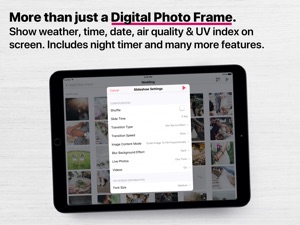
• Showtime and date on screen (choose between 12-hour time format or 24-hour time format)
• Show Weather on screen (Weather, temperature, location, IV Index, Air Pollution Index)
• Timer Control (Choose when you want to start and end the slideshow and the slideshow will start and end at the desired times)
• Display Photos, Live Photos & Videos
ADDITIONAL FEATURES
• Optimized for a large number of images
• Thumbnails view
• Full screen
• Slideshow mode or manual navigation
• Option to select manually which photos or albums to be displayed
• Option to display all albums or moments.
• Share the photos on Facebook, Flickr, E-mail, AirPrint...
• Landscape or portrait orientation
• Photo captions
• Dark mode
EXAMPLE OF USE CASES
• Display memories with ease
• A professional way to showcase your images to clients
Digital Photo Frame uses all the most important capabilities of an iOS device to turn your iPad or iPhone into a high-quality photo frame to feature your chosen photos in a slideshow.
No doubt that powerful performance and visual effects, screen quality and touchscreen controls of the all-purpose iOS device are definitely better than similar features of the specialized cheap analogs at the stores.
Digital Photo Frame extends active life of any iOS device allowing them to serve as a great photo frame and remind the perfect moments of your life.
SUBSCRIPTIONS
• Yearly Premium Subscription (Enjoy all features for 1 year)
Cancel subscription any time. Subscription automatically renews unless auto-renew is turned off at least 24-hours before the end of the current period by going to your iOS Account Settings after purchase. Payment will be charged to iTunes Account. Any unused portion of free trial period, if offered, will be forfeited when you purchase a subscription.
Terms and conditions - https://www.digitalphotoframeapp.com/terms/
Privacy Policy - https://www.digitalphotoframeapp.com/privacy/
For more information or questions, please contact at info@digitalphotoframeapp.com

Novità nella versione 4.8.3

We made some app improvements so you can keep seeing all your favorite photos and videos:
Love the app? Rate us! Your feedback keeps us coding to make the App better every day!
Questions? Contact us via info@digitalphotoframeapp.com. We'd love to speak to you. Thanks you!

Rivenditore

Nome

Manuel Escrig Ventura

Informazioni

Categorie

Versione

4.8.3

Dimensione

58,6 MB

Game Center

No

VPP Device Licensing

Classifica

Valutato 17+ per:
Raro/Moderato contenuto sessuale o nudità
Raro/Moderato contenuto adatto a un pubblico adulto
Accesso web senza restrizioni

Compatibilità

iOS 9.2 o successivo

Dispositivi

iPhone 4S, iPhone 5, iPhone 5c, iPhone 5s, iPhone 6, iPhone 6 Plus, iPhone 6s, iPhone 6s Plus, iPhone SE, iPhone 7, iPhone 7 Plus, iPhone 8, iPhone 8 Plus, iPhone X, iPhone XR, iPhone XS, iPhone XS Max, iPhone 11, iPhone 11 Pro, iPhone 11 Pro Max, iPhone SE (2a generazione), iPhone 12, iPhone 12 Pro, iPhone 12 Pro Max, iPhone 12 mini, iPad 2 (Wi-Fi), iPad 2 (3G), iPad (3a generazione) (Wi-Fi), iPad (3a generazione) (4G), iPad (4ª generazione) (Wi-Fi), iPad (4ª generazione) (4G), iPad (5ª generazione) Wi-Fi, iPad (5ª generazione) Wi-Fi + Cellular, iPad (6a generazione) Wi-Fi, iPad (6a generazione) Wi-Fi + Cellular, iPad Pro, iPad Pro (Cellular), iPad Pro (9,7 pollici), iPad Pro (9,7 pollici) (Cellular), iPad Pro da 12,9 pollici (2a generazione), iPad Pro da 12,9 pollici (2a generazione) Wi-Fi + Cellular, iPad Pro da 10,5 pollici, iPad Pro da 10,5 pollici Wi-Fi + Cellular, iPad Pro da 11 pollici, iPad Pro da 11 pollici Wi-Fi + Cellular, iPad Pro da 12,9 pollici (3a generazione), iPad Pro da 12,9 pollici (3a generazione) Wi-Fi + Cellular, iPad Air, iPad Air (Cellular), iPad Air 2, iPad Air 2 (Cellular), iPad Air (terza generazione), iPad Air (terza generazione) Wi-Fi + Cellular, iPad mini (Wi-Fi), iPad mini (4G), iPad mini Retina, iPad mini Retina (Cellular), iPad mini 3, iPad mini 3 (Cellular), iPad mini 4, iPad mini 4 (Cellular), iPad mini (5ª generazione), iPad mini (5ª generazione) Wi-Fi + Cellular, iPad (7ª generazione) Wi-Fi + Cellular, iPad Pro da 11 pollici (2a generazione), iPad Pro da 11 pollici (2a generazione) Wi-Fi + Cellular, iPad Pro da 12,9 pollici (4a generazione), iPad Pro da 12,9 pollici (4a generazione) Wi-Fi + Cellular, iPad Air (4ª generazione) (Wi-Fi), iPad Air (4ª generazione) (Wi-Fi + Cellular), iPad (8ª generazione) Wi-Fi, iPad (8ª generazione) Wi-Fi + Cellular, iPad Pro da 11 pollici (3a generazione), iPad Pro da 11 pollici (3a generazione) Wi-Fi + Cellular, iPad Pro da 12,9 pollici (5ª generazione), iPad Pro da 12,9 pollici (5ª generazione) Wi-Fi + Cellular, iPod touch (5ª generazione), iPod touch (sesta generazione), iPod touch (7ª generazione)

Lingue

cinese, giapponese, inglese, portoghese, russo, spagnolo, tedesco

App Store: Valutazione dei clienti

Valutazioni e recensioni

2,5 di 5 (3 valutazioni)

App Store: Recensioni clienti

2021-02-08

Poorly coded and steep price

Though I got the one for all slideshow app then i got totally disappointed:
1) ken burns effect is too fast even on slowest setting and should do single transition instead of jumping around the picture with no fluid movement (just try to set transition time to more than 3 second and You’ll experience this erratic behaviour).
2) flickr seems to accept public profile photo only(why so?)
3) access to icloud is not straightforward as per other features such mixing different photo from different services (do we need to discuss a slideshow app LEARNING CURVE!?!)
4) need subscription to free trial JUST TO SHOW A SIMPLE PREVIEW?!?triying to rely on forgetful users who will be charged after a week for just try this “slideshow app”
30€ seemed appropriate for a lifetime of gorgeous slideshows,
But the right price for poorely coded ones is 0€ even for a free app this would be disappointing!
Users: be more attentive what you pay for
News and broadcaster: stop selling good reviews or employ competent people to do so
Coders: just code up better peoples’ money doesn’t grow on threes
maki#likes
Versione 4.3
2020-03-01

Prezzo esagerato

Considerato che la app offre una soluzione per una cornice di casa il prezzo è davvero una pazzia. Avrei preferito un acquisto singolo una tantum di 10 euro. Un abbonamento annuale non ha davvero senso. Peccato.
B. Riccardo
Versione 3.6.1