Aggiornamento


Istantanee iPhone



Istantanee iPad


Descrizione
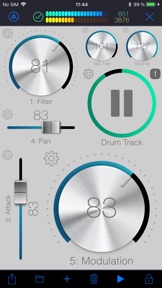
WiDI is a control surface with an integrated step sequencer in which you create controls such as buttons, pads, knobs and faders to send MIDI events and play sequences.
• CONTROL SURFACE AND SEQUENCER:
A control is bound to a channel and a specific MIDI Control Change. You can either specify the CC number if you know it, or let the app learn it. Once placed on the surface, use this control to interact with your MIDI device. Alternatively, any CC event sent by your device will be shown live by the control(s) bound to this CC.
Pads are special controls: they can either produce MIDI CC events, Notes or Program changes. If bound to a CC, the pad can act as an on/off switch (you specify the values for each state.) If bound to a note, each tap produces the specified MIDI note. This is especially useful to operate MIDI instruments without keyboards such as synthesizer modules or drum machines.
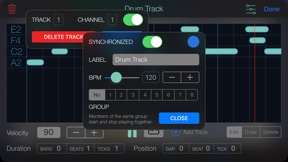
A sequence can hold as many tracks as you wish, and send notes to different MIDI channels. Sequences can play in sync or running freely. You may also group sequences together to start or pause them at the same time.
• MIDI:
To interface WiDI with any MIDI instruments/devices connected to your Mac or PC, connect to a MIDI Network Session on your Mac or your PC. On a Mac, this is natively supported by macOS, and you do not need to install third party software (use Audio MIDI Setup.) On a PC running Windows, you might want to install rtpMIDI.
As an alternative to MIDI Network Sessions, you may use the WiDI Desktop Application. It acts as a MIDI bridge between the network and your MIDI hardware. You can install the desktop application on as many computers as you want (it's free!). It's a very lightweight package that doesn't need to perform any installation procedure whatsoever.
You may download the WiDI Desktop Application for macOS on the Mac App Store, or go to : https://www.hypertide.com/widi/ for both macOS and Windows archives.
Additionally, any class-compliant MIDI interface natively supported by iOS can also be used directly by WiDI without the need of a network connection.
• FEATURES:
○ Use any CoreMIDI-supported MIDI interface connected to your device
○ MIDI network session: use WiDI as an external control surface for any DAW such as Logic Pro, Ableton Live, Cubase, ...
○ Multiple iPhone and iPad can connect to your computer, allowing different control surfaces simultaneously
○ Integrated step sequencer: create sequences, each one holding as many tracks as needed
○ Sequences can run freely or in sync and start simultaneously if grouped together in fire groups
○ Auto discover MIDI CC : you don't need to know each one to add controls, WiDI learns CC numbers sent by your devices
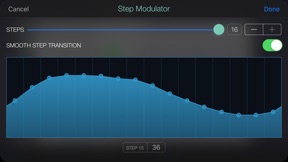
○ Automate CC : sweep ranges or use the step modulator to design patterns to modulate controls values, supporting various advanced options like step-by-step or smooth variations, bouncing, repeating, changing speed
○ Add as many pads as you want to generate MIDI Notes, Control Changes or Program Changes
○ Flexible control surface : set layout and grid size for both portrait and landscape orientations
○ Re-arranging controls is as simple as drag & drop
○ Fully customizable user interface : themes, colors, display of values and labels, aspect ratios, grid spacing, grid coloring, background, ...
○ Integrated File Manager to load and save your surfaces, which are also accessible in the iOS Files app and your computer's iTunes connection
○ Exchange surfaces between devices with the integrated QR code generator and scanner
○ Or use the share feature, so you may import them on any device.
We'd love to hear from you! Should you be in need of support or eager to request a new feature, please contact us at support+widi@hypertide.com
Novità nella versione 1.8.3
IMPORTANT note for WiDI Desktop App users: upgrade the Desktop App to version 1.0.2 if you intend yo send program changes!
Version 1.8.3:
• More bug fixes!
New in versions 1.8.x:
• Send program change (select patch on any MIDI device compatible with MSB/LSB/PC program change messages)
• Corrected many UI issues (including keyboard covering dialogs in some situations)
• MIDI channel of pads can now be modified
• Compatibility with latests iOS and iPadOS releases, while still maintaining support down to iOS 10 (!)
Rivenditore
Nome
HYPERTIDE
Informazioni
Sviluppatore
Categorie
Versione
1.8.3
Dimensione
27,3 MB
Game Center
No
VPP Device Licensing
Sì
Classifica
Classificazione: 4+
Compatibilità
iOS 10.0 o successivo
Dispositivi
iPhone 5s, iPhone 6, iPhone 6 Plus, iPhone 6s, iPhone 6s Plus, iPhone SE, iPhone 7, iPhone 7 Plus, iPhone 8, iPhone 8 Plus, iPhone X, iPhone XR, iPhone XS, iPhone XS Max, iPhone 11, iPhone 11 Pro, iPhone 11 Pro Max, iPhone SE (2a generazione), iPhone 12, iPhone 12 Pro, iPhone 12 Pro Max, iPhone 12 mini, iPhone 13, iPhone 13 Pro, iPhone 13 Pro Max, iPhone 13 mini, iPhone SE (3a generazione), iPhone 14, iPhone 14 Plus, iPhone 14 Pro, iPhone 14 Pro Max, iPhone 15, iPhone 15 Plus, iPhone 15 Pro, iPhone 15 Pro Max, iPhone 16, iPhone 16 Plus, iPhone 16 Pro, iPhone 16 Pro Max, iPhone 16e, iPhone 17, iPhone 17 Pro, iPhone 17 Pro Max, iPhone Air, iPad (5ª generazione) Wi-Fi, iPad (5ª generazione) Wi-Fi + Cellular, iPad (6a generazione) Wi-Fi, iPad (6a generazione) Wi-Fi + Cellular, iPad Pro, iPad Pro (Cellular), iPad Pro (9,7 pollici), iPad Pro (9,7 pollici) (Cellular), iPad Pro da 12,9 pollici (2a generazione), iPad Pro da 12,9 pollici (2a generazione) Wi-Fi + Cellular, iPad Pro da 10,5 pollici, iPad Pro da 10,5 pollici Wi-Fi + Cellular, iPad Pro da 11 pollici, iPad Pro da 11 pollici Wi-Fi + Cellular, iPad Pro da 12,9 pollici (3a generazione), iPad Pro da 12,9 pollici (3a generazione) Wi-Fi + Cellular, iPad Air, iPad Air (Cellular), iPad Air 2, iPad Air 2 (Cellular), iPad Air (terza generazione), iPad Air (terza generazione) Wi-Fi + Cellular, iPad mini Retina, iPad mini Retina (Cellular), iPad mini 3, iPad mini 3 (Cellular), iPad mini 4, iPad mini 4 (Cellular), iPad mini (5ª generazione), iPad mini (5ª generazione) Wi-Fi + Cellular, iPad (7ª generazione) Wi-Fi + Cellular, iPad Pro da 11 pollici (2a generazione), iPad Pro da 11 pollici (2a generazione) Wi-Fi + Cellular, iPad Pro da 12,9 pollici (4a generazione), iPad Pro da 12,9 pollici (4a generazione) Wi-Fi + Cellular, iPad Air (4ª generazione) (Wi-Fi), iPad Air (4ª generazione) (Wi-Fi + Cellular), iPad (8ª generazione) Wi-Fi, iPad (8ª generazione) Wi-Fi + Cellular, iPad Pro da 11 pollici (3a generazione), iPad Pro da 11 pollici (3a generazione) Wi-Fi + Cellular, iPad Pro da 12,9 pollici (5ª generazione), iPad Pro da 12,9 pollici (5ª generazione) Wi-Fi + Cellular, iPad (9ª generazione), iPad (9ª generazione) Wi-Fi + Cellular, iPad mini (6ª generazione), iPad mini (6ª generazione) Wi-Fi + Cellular, iPad Air (5a generazione), iPad Air (5a generazione) Wi-Fi + Cellular, iPad Pro da 11 pollici (4a generazione), iPad Pro da 11 pollici (4a generazione) Wi-Fi + Cellular, iPad Pro da 12,9 pollici (6a generazione), iPad Pro da 12,9 pollici (6a generazione) Wi-Fi + Cellular, iPad (10a generazione), iPad (10a generazione) Wi-Fi + Cellular, iPad Air da 11 pollici (M2) Wi-Fi, iPad Air da 13 pollici (M2) Wi-Fi, iPad Air da 13 pollici (M2) Wi-Fi + Cellular, iPad Pro da 11 pollici (M4) Wi-Fi, iPad Pro da 11 pollici (M4) Wi-Fi + Cellular, iPad Pro da 13 pollici (M4) Wi-Fi, iPad Pro da 13 pollici (M4) Wi-Fi + Cellular, iPad mini (A17 Pro) Wi-Fi, iPad mini (A17 Pro) Wi-Fi + Cellular, iPad (A16) Wi-Fi, iPad (A16) Wi-Fi + Cellular, iPad Air da 11 pollici (M3) Wi-Fi, iPad Air da 11 pollici (M3) Wi-Fi + Cellular, iPad Air da 13 pollici (M3) Wi-Fi, iPad Air da 13 pollici (M3) Wi-Fi + Cellular, iPad Pro da 11 pollici (M5) Wi-Fi, iPad Pro da 11 pollici (M5) Wi-Fi + Cellular, iPad Pro da 13 pollici (M5) Wi-Fi, iPad Pro da 13 pollici (M5) Wi-Fi + Cellular, iPod touch (sesta generazione), iPod touch (7ª generazione)
Lingue
inglese
App Store: Valutazione dei clienti
Valutazioni e recensioni
1,0 di 5 (1 valutazione)
App Store: Recensioni clienti
Nessuna voce