InformazioniTerminiPrivacyContatto
 
Aggiornamento
Smallpdf

Smallpdf

Data release: 2019-12-13
© 2019 Smallpdf GmbH
Smallpdf - QR Code
Versione 1.14.2
4+
Scarica su App Store
Versione 1.14.2
4+
Scarica su App Store
Data release: 2019-12-13
© 2019 Smallpdf GmbH

Istantanee iPhone

Screenshot
Screenshot
Screenshot
Screenshot
Screenshot
Screenshot

Istantanee iPad

Screenshot
Screenshot
Screenshot
Screenshot
Screenshot
Screenshot

Descrizione

Scan documents to PDF format
Scan, edit, convert, compress, and share PDFs with your iOS device.
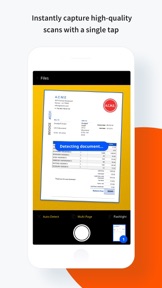
Smallpdf is the first and only PDF software users love. That’s why we’ve brought a suite of handy PDF tools straight to your iOS device—with the Smallpdf Scanner App. Now you can instantly capture high-quality scans, edit PDFs, convert and compress files, and share your documents with a single tap.
Whether you need to convert a work contract to PDF format for emailing, send paperwork online, or archive documents digitally, Smallpdf Scanner is the companion app for all your PDF needs.
With the Smallpdf Scanner App, You Can:
Create pixel-perfect, 200+ DPI PDF scans from your camera
Convert PDF to Word and Word to PDF
Convert PDF to JPG and JPG to PDF
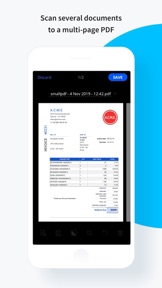
Scan several documents to a multi-page PDF
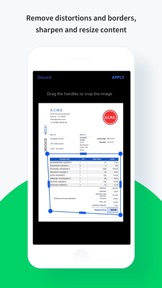
Remove distortions and borders
Sharpen and resize content
Use basic compression to reduce file size by 40%
Use strong compression to reduce file size by 75%
View, Enhance, or Edit PDFs
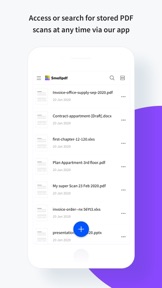
Search for and access stored PDF scans any time
View PDFs, JPGs, and Word documents
Merge multiple scanned pages into a single PDF
Rearrange, rotate, crop, or remove pages with ease
Search and copy content with built-in optical character recognition (OCR)
Activate read mode for easier reading
Optimize the size, color, or page layout of converted scans
Rename files as needed
File Storage & Integrations
Sync scans to the online Smallpdf file storage service
Email or send PDF scans to your other apps, e.g., WhatsApp, Viber, or Gmail
Share PDF files with others using Airdrop
How to Create a Scanned PDF Using Smallpdf
Open the Smallpdf Scanner App.
Take a photo of your document or import an existing file or picture from your phone or tablet.
Rename, rotate, crop, or adjust the colors of the file.
Click ‘Save’ to create and save a new PDF scan.
Seamlessly access the PDF on your other devices.
Continue to review, modify, or share the PDF.
Quick, Efficient, & Free PDF Scanning
Smallpdf Scanner App is entirely free. It’s also the smartest way to digitize all your physical paperwork using only your mobile device. Your PDFs will also be imported to our website where you can use over 20 tools to convert your PDFs to other file types (Word, PowerPoint, Excel, or JPG), compress, e-Sign, and even annotate your PDF documents.
Work on the Go
Do you work remotely or frequently travel for work? With Smallpdf Scanner, you can immediately create and organize PDF scans using your iPhone or iPad whenever you please. Smallpdf Scanner App also acts as a free PDF reader, allowing you to analyze the content of your paper document when you’re out of the office or on the go.
About Smallpdf
Smallpdf is the first and only PDF software you’ll love. With over 500 million users across 200 countries, we’re on a mission to streamline digital document paperwork for business teams and individuals with our suite of easy-to-use PDF tools.
Privacy Policy and Terms & Conditions: https://smallpdf.com/legal
Novità nella versione 1.14.2

What's New?
- Now you can reorder, rotate, and delete pages in your PDF with our new Organize pages tool
- We've squashed some bugs and improved app stability.

Rivenditore

Nome

Smallpdf GmbH

URL

Informazioni

Sviluppatore

Categorie

Versione

1.14.2

Dimensione

85,2 MB

Game Center

No

VPP Device Licensing

Classifica

Classificazione: 4+

Compatibilità

iOS 11.4 o successivo

Dispositivi

iPhone 5s, iPhone 6, iPhone 6 Plus, iPhone 6s, iPhone 6s Plus, iPhone SE, iPhone 7, iPhone 7 Plus, iPhone 8, iPhone 8 Plus, iPhone X, iPhone XR, iPhone XS, iPhone XS Max, iPhone 11, iPhone 11 Pro, iPhone 11 Pro Max, iPhone SE (2a generazione), iPad (5ª generazione) Wi-Fi, iPad (5ª generazione) Wi-Fi + Cellular, iPad (6a generazione) Wi-Fi, iPad (6a generazione) Wi-Fi + Cellular, iPad Pro, iPad Pro (Cellular), iPad Pro (9,7 pollici), iPad Pro (9,7 pollici) (Cellular), iPad Pro da 12,9 pollici (2a generazione), iPad Pro da 12,9 pollici (2a generazione) Wi-Fi + Cellular, iPad Pro da 10,5 pollici, iPad Pro da 10,5 pollici Wi-Fi + Cellular, iPad Pro da 11 pollici, iPad Pro da 11 pollici Wi-Fi + Cellular, iPad Pro da 12,9 pollici (3a generazione), iPad Pro da 12,9 pollici (3a generazione) Wi-Fi + Cellular, iPad Air, iPad Air (Cellular), iPad Air 2, iPad Air 2 (Cellular), iPad Air (terza generazione), iPad Air (terza generazione) Wi-Fi + Cellular, iPad mini Retina, iPad mini Retina (Cellular), iPad mini 3, iPad mini 3 (Cellular), iPad mini 4, iPad mini 4 (Cellular), iPad mini (5ª generazione), iPad mini (5ª generazione) Wi-Fi + Cellular, iPad (7ª generazione) Wi-Fi, iPad Pro da 11 pollici (2a generazione), iPad Pro da 11 pollici (2a generazione) Wi-Fi + Cellular, iPad Pro da 12,9 pollici (4a generazione), iPad Pro da 12,9 pollici (4a generazione) Wi-Fi + Cellular, iPod touch (sesta generazione), iPod touch (7ª generazione)

Lingue

italiano, arabo, cinese, coreano, danese, francese, giapponese, hindi, indonesiano, inglese, malese, norvegese bokmal, olandese, polacco, portoghese, russo, spagnolo, svedese, tedesco, thai, turco, ucraino, vietnamita

App Store: Valutazione dei clienti

Valutazioni e recensioni

4,0 di 5 (24 valutazioni)

App Store: Recensioni clienti

2020-08-17

La app non è all’altezza

Online il servizio è eccezionale, ma questa app non è per nulla all’altezza. Probabilmente è solo immatura.
CAppa66
Versione 1.14.2
2020-08-07

Favoloso

Funziona perfettamente
Nickenroe
Versione 1.14.1
2020-07-18

App

Ottimo
Danilocrimi
Versione 1.12.1
2020-07-07

Non è chiaro come disdire la prova gratuita

Non si trova come disdire la prova gratuita ho scritto e nessuno mi risponde per cancellare l’abbonamento gratuito di prova. Non mi sembra una cosa trasparente e nemmeno seria
lolarent24
Versione 1.12.1
2020-06-21

Pessimo

Dove finiscono i file convertiri?
kalle11
Versione 1.12.1
2020-05-20

Applicazione fantastica

Chiara e molto funzionale . Bravissimi
Angytagtravel
Versione 1.11.0