Aggiornamento


Istantanee iPhone





Istantanee iPad




Descrizione
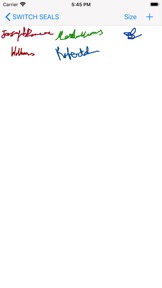
This app creates Signature seals, digital Company Seals and Date seals.
The user can stamp the Company seal, the Signature seal and the Date seal on pdf and save it.
The user can lock the pdf document with password.
The user can unlock pdf document, sign/seal/date the document and save it as new copy and lock the new document if required.
The user can lock the pdf document with empty password(Encrypt only).
Original pdf documents are not changed.
But,Seal impressions are permanent on saved Pdf Documents.Seal impressions are not pdf annotations.
Create A New Signature:-
Hit + button
Select Pen thickness.
Select Pen colour.
Sign in the white box(iPhone - bottom to top)
Save the seal.The user can create as many signs as he requires.
The sign can be exported(shared) if required.
Signature size in inches can be changed(1 5/8 inches to 2 1/2 inches).
Other signature images can be imported to this app.
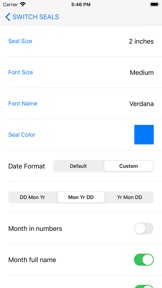
Date seal settings:-
Date seal size in inches can be changed(1 5/8 inches to 2 1/2 inches).
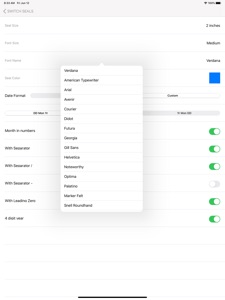
Font size and font name can be changed.
Seal colour can be changed.
Default date gives the device default date format.
The user can customise date format.
Date format with / or - separator can be used.
Date format with leading zeros(eg. 02/02/2020)can be selected or unselected.
Month in letters can be selected(eg. June, 11 2020).
Four digit or two digit year can be selected.
Create A New Seal:-
Hit + Button and
1)Select a seal Template,
2)Edit Text,
3)Leave blank for no text,
4)Select icon image if required by the template,
5)Select Other Properties of the seal
6)Preview and
7)Save the seal.
Note:- Company Icon Images needs to be 1024 pt x 1024 pt image with/without transparent background.Lower resolution icons may give poor quality seal images.
Eight seal templates are provided.
The following can be chosen by the user:-
1)Seal colour
2)Seal Type
3)Border Type
4)Inner Border Type
5)Font Size
6)Font Name
7)Icon type(Round or Square)
8)Icon colour (seal colour mask or original).
9)Rotation 0-30 deg left/right
10)Yin or Yang Seal.
Yang seal - Transparent background with Letters in Seal colour.
Yin Seal - Background in seal colour and Letters are transparent.
Select an Available Seal for stamping:-
1)Select a seal
2)Hit Pick seal
Export an Available Seal:-
1)Select a seal
2)Hit Export Seal
3)Save the seal image to your location
Company Seal size in inches can be changed(1 5/8 inches to 2 1/2 inches).
Other seal images can be imported to this app.
You need to import a 1024 pt x 1024 pt png/tiff image.The seal image background needs to be transparent.
Note:- Avoid very Dark Colours for Emboss or Wax Seal types.
Delete an Available Seal:-
1)Select a seal
2)Hit Delete Seal
Stamping On Pdf:-
Hit Import Pdf & Choose a Pdf Document.
Hit Switch. Select seal:-
1)Company seal
2)Signature seal
3)Date seal
Go to the page where you want to stamp.
Move to the required location on the page.
Tap to stamp.
Reset Selected page:-
1)Select the page
2) Hit Clear
www.appskou.com for support
Novità nella versione 2.5
Updated for iOS 16.6 and above.
Informazioni
Sviluppatore
Categorie
Versione
2.5
Dimensione
6,9 MB
Game Center
No
VPP Device Licensing
Sì
Classifica
Classificazione: 4+
Compatibilità
iOS 16.6 o successivo
Dispositivi
iPhone 5s, iPhone 6, iPhone 6 Plus, iPhone 6s, iPhone 6s Plus, iPhone SE, iPhone 7, iPhone 7 Plus, iPhone 8, iPhone 8 Plus, iPhone X, iPhone XR, iPhone XS, iPhone XS Max, iPhone 11, iPhone 11 Pro, iPhone 11 Pro Max, iPhone SE (2a generazione), iPhone 12, iPhone 12 Pro, iPhone 12 Pro Max, iPhone 12 mini, iPhone 13, iPhone 13 Pro, iPhone 13 Pro Max, iPhone 13 mini, iPhone SE (3a generazione), iPhone 14, iPhone 14 Plus, iPhone 14 Pro, iPhone 14 Pro Max, iPhone 15, iPhone 15 Plus, iPhone 15 Pro, iPhone 15 Pro Max, iPhone 16, iPhone 16Plus, iPhone 16Pro, iPhone 16ProMax, iPad (5ª generazione) Wi-Fi, iPad (5ª generazione) Wi-Fi + Cellular, iPad (6a generazione) Wi-Fi, iPad (6a generazione) Wi-Fi + Cellular, iPad Pro, iPad Pro (Cellular), iPad Pro (9,7 pollici), iPad Pro (9,7 pollici) (Cellular), iPad Pro da 12,9 pollici (2a generazione), iPad Pro da 12,9 pollici (2a generazione) Wi-Fi + Cellular, iPad Pro da 10,5 pollici, iPad Pro da 10,5 pollici Wi-Fi + Cellular, iPad Pro da 11 pollici, iPad Pro da 11 pollici Wi-Fi + Cellular, iPad Pro da 12,9 pollici (3a generazione), iPad Pro da 12,9 pollici (3a generazione) Wi-Fi + Cellular, iPad Air, iPad Air (Cellular), iPad Air 2, iPad Air 2 (Cellular), iPad Air (terza generazione), iPad Air (terza generazione) Wi-Fi + Cellular, iPad mini Retina, iPad mini Retina (Cellular), iPad mini 3, iPad mini 3 (Cellular), iPad mini 4, iPad mini 4 (Cellular), iPad mini (5ª generazione), iPad mini (5ª generazione) Wi-Fi + Cellular, iPad (7ª generazione) Wi-Fi + Cellular, iPad Pro da 11 pollici (2a generazione), iPad Pro da 11 pollici (2a generazione) Wi-Fi + Cellular, iPad Pro da 12,9 pollici (4a generazione), iPad Pro da 12,9 pollici (4a generazione) Wi-Fi + Cellular, iPad Air (4ª generazione) (Wi-Fi), iPad Air (4ª generazione) (Wi-Fi + Cellular), iPad (8ª generazione) Wi-Fi, iPad (8ª generazione) Wi-Fi + Cellular, iPad Pro da 11 pollici (3a generazione), iPad Pro da 11 pollici (3a generazione) Wi-Fi + Cellular, iPad Pro da 12,9 pollici (5ª generazione), iPad Pro da 12,9 pollici (5ª generazione) Wi-Fi + Cellular, iPad (9ª generazione), iPad (9ª generazione) Wi-Fi + Cellular, iPad mini (6ª generazione), iPad mini (6ª generazione) Wi-Fi + Cellular, iPad Air (5a generazione), iPad Air (5a generazione) Wi-Fi + Cellular, iPad Pro da 11 pollici (4a generazione), iPad Pro da 11 pollici (4a generazione) Wi-Fi + Cellular, iPad Pro da 12,9 pollici (6a generazione), iPad Pro da 12,9 pollici (6a generazione) Wi-Fi + Cellular, iPad (10a generazione), iPad (10a generazione) Wi-Fi + Cellular, iPad Air da 11 pollici (M2) Wi-Fi, iPad Air da 13 pollici (M2) Wi-Fi, iPad Air da 13 pollici (M2) Wi-Fi + Cellular, iPad Pro da 11 pollici (M4) Wi-Fi, iPad Pro da 11 pollici (M4) Wi-Fi + Cellular, iPad Pro da 13 pollici (M4) Wi-Fi, iPad Pro da 13 pollici (M4) Wi-Fi + Cellular, iPad MiniA17Pro, iPad MiniA17ProCellular, iPod touch (sesta generazione), iPod touch (7ª generazione), Mac Desktop
Lingue
inglese
App Store: Valutazione dei clienti
Valutazioni e recensioni
0,0 di 5 (Nessuna valutazione)
App Store: Recensioni clienti
Nessuna voce