InformazioniTerminiPrivacyContatto
 
Aggiornamento
PassDiary Password Manager

PassDiary Password Manager

Data release: 2009-12-17
© Epicomm Technologies Ltd
PassDiary Password Manager - QR Code
Versione 1.7.9
17+
Scarica su App Store
Versione 1.7.9
17+
Scarica su App Store
Data release: 2009-12-17
© Epicomm Technologies Ltd

Istantanee iPhone

Screenshot
Screenshot
Screenshot
Screenshot
Screenshot
Screenshot
Screenshot
Screenshot

Istantanee iPad

Screenshot
Screenshot
Screenshot
Screenshot
Screenshot
Screenshot
Screenshot
Screenshot

Descrizione

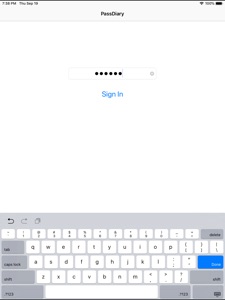
Passdiary is a password manager and password wallet that let you securely store all your accounts important information in a vault. Passdiary does not access any of your precious information and none of your data will be stored in cloud or any other server.
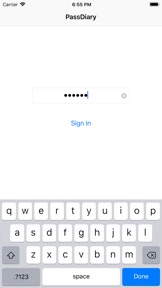
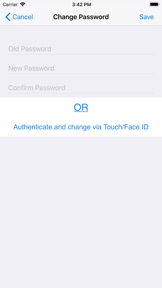
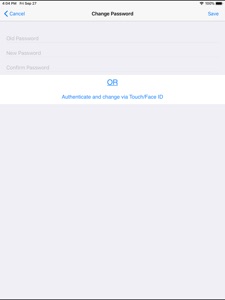
To access all your stored accounts passwords you just required to remember one password of Passdiary. Passdiary can be used to store the information of your email accounts, shopping accounts, social accounts, credit/debit cards, device logins and a lot.

Using Passdiary first time?
Passdiary is available just for $1 with lifetime access for iOS platforms and can be accessed on mobiles, tablets and iPad.
Passdiary Features:-
-Passdiary App is very simple and easy to use
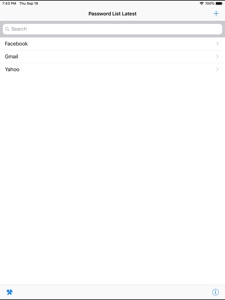
-Smart search to Password listing page
-Password details can be saved with website URL, title, username & password with description
-Random password generation using alphabets, numbers, special characters
-Working offline (Does not require internet connectivity)
-Passwords are safely stored on the device
-Application is very highly secured against vulnerabilities
-Strong Encryption (256-bit Advanced Encryption Standard
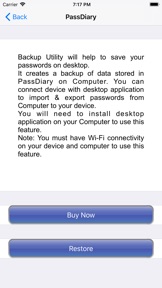
-Backup utility to back up your passwords on a PC/Mac which is having Java installed.
-Every query related on how to use the app is provided on website.
Password diary – Makes easy to keep a record of all your account password with descriptions
Password vault for storage – Let you store and easily search all your passwords at a single place
Secure password vault – Passdiary does not connect with internet and does not synchronize with any of your accounts.
What is Backup utility?
Backup Utility is developed for Passdiary users, so as to save and restore passwords whenever required.
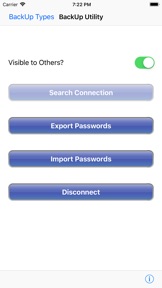
The backup utility is a Desktop software for Windows/Mac devices which transfers your passwords from your Tablet/iPhone/iPod device to your computer and vice-versa with some easy steps.
How Backup utility works?
In the back up process a file (.epk) is exported to Windows/Mac device from your mobile uses 256 Bit encryption security. Your backup file on PC cannot be opened by any other program.
Desktop utility will never connect to Internet and all your passwords are safe with 256 Bit encryption security used to encrypt backup file.
Desktop utility also works with Mountain Lion OS. The use of this facility is recommended in situations where you are resetting your device to factory settings or formatting your desktop with iTunes or re-installing the iTunes. It also works for circumstances in which your Computer iTunes is infected with Trojan, or you want to switch to another device. iTunes also provides backup features but it may not necessarily support backups in situations mentioned above
Backup Utility is available as an In App purchase just for $0.99 or price equivalent to your country’s currency. Please check http://passdiary.com to see the snapshots that will give you an idea as to how you can do this and get going.

Novità nella versione 1.7.9

- Minor Bug Fixes

Rivenditore

Nome

Epicomm Technologies Ltd

Informazioni

Categorie

Versione

1.7.9

Dimensione

29,3 MB

Game Center

No

VPP Device Licensing

Classifica

Valutato 17+ per:
Accesso web senza restrizioni

Compatibilità

iOS 9.0 o successivo

Dispositivi

iPhone 4S, iPhone 5, iPhone 5c, iPhone 5s, iPhone 6, iPhone 6 Plus, iPhone 6s, iPhone 6s Plus, iPhone SE, iPhone 7, iPhone 7 Plus, iPhone 8, iPhone 8 Plus, iPhone X, iPhone XR, iPhone XS, iPhone XS Max, iPhone 11, iPhone 11 Pro, iPhone 11 Pro Max, iPhone SE (2a generazione), iPhone 12, iPhone 12 Pro, iPhone 12 Pro Max, iPhone 12 mini, iPhone 13, iPhone 13 Pro, iPhone 13 Pro Max, iPhone 13 mini, iPhone SE (3a generazione), iPhone 14, iPhone 14 Plus, iPhone 14 Pro, iPhone 14 Pro Max, iPhone 15, iPhone 15 Plus, iPhone 15 Pro, iPhone 15 Pro Max, iPhone 16, iPhone 16 Plus, iPhone 16 Pro, iPhone 16 Pro Max, iPhone 16e, iPad 2 (Wi-Fi), iPad 2 (3G), iPad (3a generazione) (Wi-Fi), iPad (3a generazione) (4G), iPad (4ª generazione) (Wi-Fi), iPad (4ª generazione) (4G), iPad (5ª generazione) Wi-Fi, iPad (5ª generazione) Wi-Fi + Cellular, iPad (6a generazione) Wi-Fi, iPad (6a generazione) Wi-Fi + Cellular, iPad Pro, iPad Pro (Cellular), iPad Pro (9,7 pollici), iPad Pro (9,7 pollici) (Cellular), iPad Pro da 12,9 pollici (2a generazione), iPad Pro da 12,9 pollici (2a generazione) Wi-Fi + Cellular, iPad Pro da 10,5 pollici, iPad Pro da 10,5 pollici Wi-Fi + Cellular, iPad Pro da 11 pollici, iPad Pro da 11 pollici Wi-Fi + Cellular, iPad Pro da 12,9 pollici (3a generazione), iPad Pro da 12,9 pollici (3a generazione) Wi-Fi + Cellular, iPad Air, iPad Air (Cellular), iPad Air 2, iPad Air 2 (Cellular), iPad Air (terza generazione), iPad Air (terza generazione) Wi-Fi + Cellular, iPad mini (Wi-Fi), iPad mini (4G), iPad mini Retina, iPad mini Retina (Cellular), iPad mini 3, iPad mini 3 (Cellular), iPad mini 4, iPad mini 4 (Cellular), iPad mini (5ª generazione), iPad mini (5ª generazione) Wi-Fi + Cellular, iPad (7ª generazione) Wi-Fi + Cellular, iPad Pro da 11 pollici (2a generazione), iPad Pro da 11 pollici (2a generazione) Wi-Fi + Cellular, iPad Pro da 12,9 pollici (4a generazione), iPad Pro da 12,9 pollici (4a generazione) Wi-Fi + Cellular, iPad Air (4ª generazione) (Wi-Fi), iPad Air (4ª generazione) (Wi-Fi + Cellular), iPad (8ª generazione) Wi-Fi, iPad (8ª generazione) Wi-Fi + Cellular, iPad Pro da 11 pollici (3a generazione), iPad Pro da 11 pollici (3a generazione) Wi-Fi + Cellular, iPad Pro da 12,9 pollici (5ª generazione), iPad Pro da 12,9 pollici (5ª generazione) Wi-Fi + Cellular, iPad (9ª generazione), iPad (9ª generazione) Wi-Fi + Cellular, iPad mini (6ª generazione), iPad mini (6ª generazione) Wi-Fi + Cellular, iPad Air (5a generazione), iPad Air (5a generazione) Wi-Fi + Cellular, iPad Pro da 11 pollici (4a generazione), iPad Pro da 11 pollici (4a generazione) Wi-Fi + Cellular, iPad Pro da 12,9 pollici (6a generazione), iPad Pro da 12,9 pollici (6a generazione) Wi-Fi + Cellular, iPad (10a generazione), iPad (10a generazione) Wi-Fi + Cellular, iPad Air da 11 pollici (M2) Wi-Fi, iPad Air da 13 pollici (M2) Wi-Fi, iPad Air da 13 pollici (M2) Wi-Fi + Cellular, iPad Pro da 11 pollici (M4) Wi-Fi, iPad Pro da 11 pollici (M4) Wi-Fi + Cellular, iPad Pro da 13 pollici (M4) Wi-Fi, iPad Pro da 13 pollici (M4) Wi-Fi + Cellular, iPad mini (A17 Pro) Wi-Fi, iPad mini (A17 Pro) Wi-Fi + Cellular, iPad (A16) Wi-Fi, iPad (A16) Wi-Fi + Cellular, iPad Air da 11 pollici (M3) Wi-Fi, iPad Air da 11 pollici (M3) Wi-Fi + Cellular, iPad Air da 13 pollici (M3) Wi-Fi, iPad Air da 13 pollici (M3) Wi-Fi + Cellular, iPod touch (5ª generazione), iPod touch (sesta generazione), iPod touch (7ª generazione), Apple Watch Series 4, Apple Watch Series 5, Apple Watch Series 6 (GPS), Apple Watch Series 6 (GPS + Cellular), Apple Watch Series SE (GPS), Apple Watch Series SE (GPS + Cellular), Apple Watch Series 7 (GPS), Apple Watch Series 7 (GPS + Cellular), Apple Watch Series 8 (GPS), Apple Watch Series 8 (GPS + Cellular), Apple Watch SE (2a generazione) (GPS), Apple Watch SE (2a generazione) (GPS + Cellular), Apple Watch Ultra, Apple Watch Series 9 (GPS), Apple Watch Series 9 (GPS + Cellular), Apple Watch Ultra 2, Watch10, Watch10Cellular

Lingue

inglese

App Store: Valutazione dei clienti

Valutazioni e recensioni

4,5 di 5 (2 valutazioni)

App Store: Recensioni clienti

2019-08-26

Un valido aiuto anche nel lavoro

Quasi ogni giorno la consulto per districarmi nella giungla della memoria delle password più complesse e multiple. Senza quest’app. che uso da anni mi servirebbe un quaderno che poco si presterebbe ai continui aggiornamenti delle password di lavoro.
Leontinoi
Versione 1.7
2011-01-27

Ottima App...

Semplice e funzionale, quel poco che fa lo fa bene. Proprio quella che cercavo.
Mystique1979
Versione 1.0.8