InformazioniTerminiPrivacyContatto
 
Aggiornamento
MagnetMeter

MagnetMeter

Data release: 2009-12-18
© Peter Breitling
MagnetMeter - QR Code
Versione 1.9.1
4+
Scarica su App Store
Versione 1.9.1
4+
Scarica su App Store
Data release: 2009-12-18
© Peter Breitling

Istantanee iPhone

Screenshot
Screenshot
Screenshot
Screenshot
Screenshot

Istantanee iPad

Screenshot
Screenshot
Screenshot
Screenshot
Screenshot

Descrizione

The first and only Vector Magnetometer on the iPhone - Visualize the hidden world of magnetism around you in 3 dimensions (3GS or later!)! It can be perfectly used to explore and measure the direction and strength of the magnetic field of random objects around you (which can be quite fascinating!). With limitations (see docs) it can be used as a metal detector to find electric lines or pipes in walls (always good to check a wall before drilling in, at least better with this than not to check at all). Another application is to use this tool as a rough estimate of your north-south position on earth without using the GPS(!) - just by measuring the local earth magnetic declination (it works fine even while flying in a plane to check how the declination changes). Or simply explore your next Christmas present before opening it! Send us your results!
The application has four different displays modes to visualize the magnetic field:
- Absolute Mode: Displays the absolute magnetic field in microtesla (μT) measured by the magnetometer.
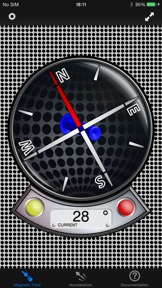
- North Mode: A compass head-up displays the geographic north along with the pointer that directs to the magnetic north (thus display difference magnetic to geographic north).
- Declination Mode: Two arrows will be displayed to indicate the declination of the earth magnetic field (0° just on equator, increasing to north with blue pointer direction up or south with blue pointer direction down).
- Relative Mode: This mode shows the relative strength (absolute minus compensation vector) of the magnetic field in μT.
… and five different display modes for acceleration visualization:
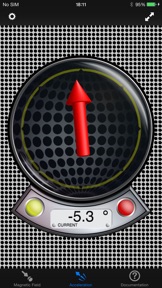
- Absolute Mode: Displays the reverse acceleration of the iPhone (1g up when hold steady).
- X-Rotation - Y-Rotation - Z-Rotation: The arrow will display the rotation around the X-, Y- and Z-Axis of the iPhone. The digital indicator shows the angle numerically (-180° - +180°). A way to calibrate will be added with one of the next updates, so you could use this as a level.
- Relative Mode: This mode shows the relative strength (absolute minus compensation vector) of the acceleration.
For a detailed documentation, please visit our product homepage.
For recreational use only. However it CAN (!) be very accurate. The measurement is performed as good as possible (we try our best) by using the inbuilt accelerometer and magnetometer to their limits. The range of the accelerometer typically has a max of ±3g (~4.2g displayed here if combined) and each magnetometer usually recalibrates internally when over ±120μT in one axis. However, tell us your experience!

Novità nella versione 1.9.1

- Support for all current iPhone and iPad models
- Bugfixes & performance optimizations
Thanks for your support!

Rivenditore

Informazioni

Sviluppatore

Versione

1.9.1

Dimensione

13,4 MB

Game Center

No

VPP Device Licensing

Classifica

Classificazione: 4+

Compatibilità

iOS 10.0 o successivo

Dispositivi

iPhone 5, iPhone 5c, iPhone 5s, iPhone 6, iPhone 6 Plus, iPhone 6s, iPhone 6s Plus, iPhone SE, iPhone 7, iPhone 7 Plus, iPhone 8, iPhone 8 Plus, iPhone X, iPhone XR, iPhone XS, iPhone XS Max, iPhone 11, iPhone 11 Pro, iPhone 11 Pro Max, iPhone SE (2a generazione), iPhone 12, iPhone 12 Pro, iPhone 12 Pro Max, iPhone 12 mini, iPhone 13, iPhone 13 Pro, iPhone 13 Pro Max, iPhone 13 mini, iPhone SE (3a generazione), iPhone 14, iPhone 14 Plus, iPhone 14 Pro, iPhone 14 Pro Max, iPhone 15, iPhone 15 Plus, iPhone 15 Pro, iPhone 15 Pro Max, iPhone 16, iPhone 16 Plus, iPhone 16 Pro, iPhone 16 Pro Max, iPhone 16e, iPhone 17, iPhone 17 Pro, iPhone 17 Pro Max, iPhone Air, iPhone 17e, iPad (4ª generazione) (Wi-Fi), iPad (4ª generazione) (4G), iPad (5ª generazione) Wi-Fi, iPad (5ª generazione) Wi-Fi + Cellular, iPad (6a generazione) Wi-Fi, iPad (6a generazione) Wi-Fi + Cellular, iPad Pro, iPad Pro (Cellular), iPad Pro (9,7 pollici), iPad Pro (9,7 pollici) (Cellular), iPad Pro da 12,9 pollici (2a generazione), iPad Pro da 12,9 pollici (2a generazione) Wi-Fi + Cellular, iPad Pro da 10,5 pollici, iPad Pro da 10,5 pollici Wi-Fi + Cellular, iPad Pro da 11 pollici, iPad Pro da 11 pollici Wi-Fi + Cellular, iPad Pro da 12,9 pollici (3a generazione), iPad Pro da 12,9 pollici (3a generazione) Wi-Fi + Cellular, iPad Air, iPad Air (Cellular), iPad Air 2, iPad Air 2 (Cellular), iPad Air (terza generazione), iPad Air (terza generazione) Wi-Fi + Cellular, iPad mini Retina, iPad mini Retina (Cellular), iPad mini 3, iPad mini 3 (Cellular), iPad mini 4, iPad mini 4 (Cellular), iPad mini (5ª generazione), iPad mini (5ª generazione) Wi-Fi + Cellular, iPad (7ª generazione) Wi-Fi + Cellular, iPad Pro da 11 pollici (2a generazione), iPad Pro da 11 pollici (2a generazione) Wi-Fi + Cellular, iPad Pro da 12,9 pollici (4a generazione), iPad Pro da 12,9 pollici (4a generazione) Wi-Fi + Cellular, iPad Air (4ª generazione) (Wi-Fi), iPad Air (4ª generazione) (Wi-Fi + Cellular), iPad (8ª generazione) Wi-Fi, iPad (8ª generazione) Wi-Fi + Cellular, iPad Pro da 11 pollici (3a generazione), iPad Pro da 11 pollici (3a generazione) Wi-Fi + Cellular, iPad Pro da 12,9 pollici (5ª generazione), iPad Pro da 12,9 pollici (5ª generazione) Wi-Fi + Cellular, iPad (9ª generazione), iPad (9ª generazione) Wi-Fi + Cellular, iPad mini (6ª generazione), iPad mini (6ª generazione) Wi-Fi + Cellular, iPad Air (5a generazione), iPad Air (5a generazione) Wi-Fi + Cellular, iPad Pro da 11 pollici (4a generazione), iPad Pro da 11 pollici (4a generazione) Wi-Fi + Cellular, iPad Pro da 12,9 pollici (6a generazione), iPad Pro da 12,9 pollici (6a generazione) Wi-Fi + Cellular, iPad (10a generazione), iPad (10a generazione) Wi-Fi + Cellular, iPad Air da 11 pollici (M2) Wi-Fi, iPad Air da 13 pollici (M2) Wi-Fi, iPad Air da 13 pollici (M2) Wi-Fi + Cellular, iPad Pro da 11 pollici (M4) Wi-Fi, iPad Pro da 11 pollici (M4) Wi-Fi + Cellular, iPad Pro da 13 pollici (M4) Wi-Fi, iPad Pro da 13 pollici (M4) Wi-Fi + Cellular, iPad mini (A17 Pro) Wi-Fi, iPad mini (A17 Pro) Wi-Fi + Cellular, iPad (A16) Wi-Fi, iPad (A16) Wi-Fi + Cellular, iPad Air da 11 pollici (M3) Wi-Fi, iPad Air da 11 pollici (M3) Wi-Fi + Cellular, iPad Air da 13 pollici (M3) Wi-Fi, iPad Air da 13 pollici (M3) Wi-Fi + Cellular, iPad Pro da 11 pollici (M5) Wi-Fi, iPad Pro da 11 pollici (M5) Wi-Fi + Cellular, iPad Pro da 13 pollici (M5) Wi-Fi, iPad Pro da 13 pollici (M5) Wi-Fi + Cellular, iPad Air da 11 pollici (M4) Wi-Fi, iPad Air da 11 pollici (M4) Wi-Fi + Cellular, iPad Air da 13 pollici (M4) Wi-Fi, iPad Air da 13 pollici (M4) Wi-Fi + Cellular, iPod touch (sesta generazione), iPod touch (7ª generazione), Apple Watch Series 4, Apple Watch Series 5, Apple Watch Series 6 (GPS), Apple Watch Series 6 (GPS + Cellular), Apple Watch Series SE (GPS), Apple Watch Series SE (GPS + Cellular), Apple Watch Series 7 (GPS), Apple Watch Series 7 (GPS + Cellular), Apple Watch Series 8 (GPS), Apple Watch Series 8 (GPS + Cellular), Apple Watch SE (2a generazione) (GPS), Apple Watch SE (2a generazione) (GPS + Cellular), Apple Watch Ultra, Apple Watch Series 9 (GPS), Apple Watch Series 9 (GPS + Cellular), Apple Watch Ultra 2, Apple Watch Series 10 (GPS), Apple Watch Series 10 (GPS + Cellular), Apple Watch Series 11 (GPS), Apple Watch Series 11 (GPS + Cellular), Apple Watch SE 3 (GPS), Apple Watch SE 3 (GPS + Cellular), Apple Watch Ultra 3 (GPS + Cellular)

Lingue

inglese, tedesco

App Store: Valutazione dei clienti

Valutazioni e recensioni

5,0 di 5 (2 valutazioni)

App Store: Recensioni clienti

2019-04-16

Ottima applicazione

Tutte le funzioni di accelerometro e magnetometro con le varie opzioni danno un chiara interpretazione dei valori e delle loro variazioni grazie al doppio display grafico e numerico.
Ovviamente la precisione dipende dalla risoluzione e offset del dispositivo su cui è installata l’applicazione.
Nanapint
2013-04-18

Very good!

The app works perfectly as it provides all functions it's designed for in a clear and accurate way as well as with a very attractive graphics!
Useful even for scientific purposes.
Francesco-science66
Versione 1.4
2012-09-21

Non funziona

Su 3GS l'accelerazione non funziona più.
ssstefanooo
Versione 1.7
2012-08-11

Utile e interessante

In particolari zone costiere mi ha permesso di individuare rocce di evidente natura vulcanica o antenne radio nelle vicinanze che producevano elevati di micro tesla.
Fratar
Versione 1.1.1
2011-03-13

Magneto meter

Una simpatica e utile applicazione con una bella grafica futurista. Complimenti agli sviluppatori, bravi! Continuate a mi gliorarla e ad aggiornarla periodicamen te, ok?! Grazie e buon lavoro!
Tantalio2
Versione 1.3
2010-11-08

Inutile

Non funziona
Alessandro.85
2010-01-27

Mr. X

Magari torna sempre utile.con possibile aggiornamento grazie.
Metagrossdivine85
2009-12-29

Magnetometro

Strumento essenziale x chi va al mare o in montagna grazie anche alla possibilita' di rilevare l'angolo magnetico.
Debiruman