Aggiornamento


Istantanee iPhone
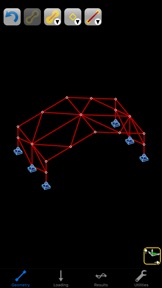
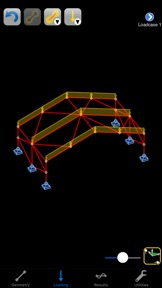

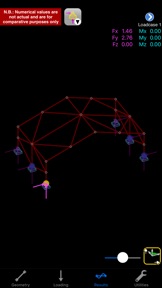

Istantanee iPad

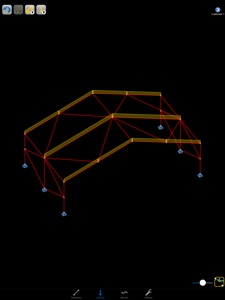


Descrizione
Structural / Civil Engineering App for aiding the intuitive understanding of the behaviour of space-frames under load.
Aimed at students, CASA Intuition allows the user to create 3D structural models and obtain both a graphical representation of the deflections and forces and also normalised numerical values for easy comparison of effects around the structure.
(Note: no actual analysis results are given.)
More information about this App can be found in its integrated help and on our website. The App also contains "Replay Demonstrations" which describe and enact its use.
=== General Technical Features ===
* Automatic analysis.
* Integrated extensive section library:
- British, European, American, Canadian, Australian, South African, Japanese, Russian.
- See our website for the range of shapes.
(Displayed property values are normalised and for comparison purposes only.)
* Integrated section generator for common shapes:
- Open: I/H, channel, zed, angle, tee.
- Hollow: Oval, Rectangular.
- Solid: Oval, Rectangular.
- Calculates: Area, Inertia, Torsional constant, Elastic moduli, mass.
(Displayed property values are normalised and for comparison purposes only.)
* Integrated material library:
- Steel, Aluminium, Concrete, Timber, Glass.
* Member ends can be rigid or pinned.
* Loads applied as point, couple, trapezoid.
* Multiple load-cases.
* Gravity (self-weight) loading.
(Numerical values are not actual; they are normalised for comparison purposes only.)
* Graphical and numerical results include:
- Reactions, deflections, bending moments, shear forces, bending stress.
- Points of interest.
- Results given all along members.
(Numerical values are not actual; they are normalised for comparison purposes only.)
=== General User Interface Features ===
* Universal App - for iPhone, iPod touch, and iPad.
* Metric & imperial units.
* Four simple interactive screens:
- Geometry, Loading, Results: for interacting with the model.
- Utilities: Supplementary functions (see below).
* Easy modelling:
- Tap to select; tap to edit.
- Move and copy geometry.
- Slide nodes along members.
- Change member spans.
- Split members.
- Replicate loading across members.
* Graphical drag-and-tap controls:
- Rotate, pan, zoom the view with simple gestures.
- Drag nodes for positions.
- Drag loads for positions and magnitudes.
- Drag marker along member to read off results values.
- Tap on Points of Interest for important results.
- Select nodes to measure distances, angles, and areas between them.
* Numeric entry available:
- Double-tap on a datum to enter its numerical value.
- Includes a convenient built-in calculator.
* Straightforward section library:
- Pick from country, shape, and size.
- View diagram and properties.
- For custom shapes, double-tap on dimensions to edit.
- Axes can be rotated by 90 degrees.
* Report generation:
- Configurable content.
- Graphical layout.
- On-screen preview.
- Export PDF by e-mail.
- AirPrint.
(Numerical values are normalised and for comparison purposes only.)
* Supplementary functions:
- Document titles.
- Choice of unit system (UK/EU Metric, US Imperial).
- On-line help.
- Load and save models.
Novità nella versione 21.09
Maintenance update.
The app now uses the standard iOS file browser, and we recommend saving any current documents and closing the app prior to updating. On first launch, if it opens in the "Recents" files tab, then browse to "On my iPad" and then to this app's documents. If the app were not fully closed prior to updating then the documents folder may appear empty when first opened, in which case close the app in the iOS home page and relaunch it.
Rivenditore
Nome
Intesym Ltd.
Informazioni
Sviluppatore
Categorie
Versione
21.09
Dimensione
5,5 MB
Game Center
No
VPP Device Licensing
Sì
Classifica
Classificazione: 4+
Compatibilità
iOS 14.1 o successivo
Dispositivi
iPhone 5s, iPhone 6, iPhone 6 Plus, iPhone 6s, iPhone 6s Plus, iPhone SE, iPhone 7, iPhone 7 Plus, iPhone 8, iPhone 8 Plus, iPhone X, iPhone XR, iPhone XS, iPhone XS Max, iPhone 11, iPhone 11 Pro, iPhone 11 Pro Max, iPhone SE (2a generazione), iPhone 12, iPhone 12 Pro, iPhone 12 Pro Max, iPhone 12 mini, iPhone 13, iPhone 13 Pro, iPhone 13 Pro Max, iPhone 13 mini, iPhone SE (3a generazione), iPhone 14, iPhone 14 Plus, iPhone 14 Pro, iPhone 14 Pro Max, iPhone 15, iPhone 15 Plus, iPhone 15 Pro, iPhone 15 Pro Max, iPad (5ª generazione) Wi-Fi, iPad (5ª generazione) Wi-Fi + Cellular, iPad (6a generazione) Wi-Fi, iPad (6a generazione) Wi-Fi + Cellular, iPad Pro, iPad Pro (Cellular), iPad Pro (9,7 pollici), iPad Pro (9,7 pollici) (Cellular), iPad Pro da 12,9 pollici (2a generazione), iPad Pro da 12,9 pollici (2a generazione) Wi-Fi + Cellular, iPad Pro da 10,5 pollici, iPad Pro da 10,5 pollici Wi-Fi + Cellular, iPad Pro da 11 pollici, iPad Pro da 11 pollici Wi-Fi + Cellular, iPad Pro da 12,9 pollici (3a generazione), iPad Pro da 12,9 pollici (3a generazione) Wi-Fi + Cellular, iPad Air, iPad Air (Cellular), iPad Air 2, iPad Air 2 (Cellular), iPad Air (terza generazione), iPad Air (terza generazione) Wi-Fi + Cellular, iPad mini Retina, iPad mini Retina (Cellular), iPad mini 3, iPad mini 3 (Cellular), iPad mini 4, iPad mini 4 (Cellular), iPad mini (5ª generazione), iPad mini (5ª generazione) Wi-Fi + Cellular, iPad (7ª generazione) Wi-Fi + Cellular, iPad Pro da 11 pollici (2a generazione), iPad Pro da 11 pollici (2a generazione) Wi-Fi + Cellular, iPad Pro da 12,9 pollici (4a generazione), iPad Pro da 12,9 pollici (4a generazione) Wi-Fi + Cellular, iPad Air (4ª generazione) (Wi-Fi), iPad Air (4ª generazione) (Wi-Fi + Cellular), iPad (8ª generazione) Wi-Fi, iPad (8ª generazione) Wi-Fi + Cellular, iPad Pro da 11 pollici (3a generazione), iPad Pro da 11 pollici (3a generazione) Wi-Fi + Cellular, iPad Pro da 12,9 pollici (5ª generazione), iPad Pro da 12,9 pollici (5ª generazione) Wi-Fi + Cellular, iPad (9ª generazione), iPad (9ª generazione) Wi-Fi + Cellular, iPad mini (6ª generazione), iPad mini (6ª generazione) Wi-Fi + Cellular, iPad Air (5a generazione), iPad Air (5a generazione) Wi-Fi + Cellular, iPad Pro da 11 pollici (4a generazione), iPad Pro da 11 pollici (4a generazione) Wi-Fi + Cellular, iPad Pro da 12,9 pollici (6a generazione), iPad Pro da 12,9 pollici (6a generazione) Wi-Fi + Cellular, iPad (10a generazione), iPad (10a generazione) Wi-Fi + Cellular, iPod touch (sesta generazione), iPod touch (7ª generazione)
Lingue
inglese
App Store: Valutazione dei clienti
Valutazioni e recensioni
1,0 di 5 (1 valutazione)
App Store: Recensioni clienti
Nessuna voce