InformazioniTerminiPrivacyContatto
 
Aggiornamento
inShort

inShort

Data release: 2011-03-09
© 2011 - 2022 Jury Shortki
inShort - QR Code
Versione 9.0
4+
Scarica su App Store
Versione 9.0
4+
Scarica su App Store
Data release: 2011-03-09
© 2011 - 2022 Jury Shortki

Istantanee iPhone

Screenshot
Screenshot
Screenshot
Screenshot
Screenshot
Screenshot

Istantanee iPad

Screenshot
Screenshot
Screenshot
Screenshot
Screenshot
Screenshot
Screenshot

Descrizione

This application offers a unique approach to project management, which represents your project not just as a plan, but as a coordinated mechanism moving towards the goal.
The original technique allows you to break down project objectives into smaller goals, processes and resources, but not get lost in the details, but always see the overall structure of the project as a whole. After all, project management is not a mechanical observance of the plan, but the achievement of project goals, which should not be overlooked.
The application combines the classic project approach based on Gantt charts and project management through workflow diagrams. As a rule, Gantt charts are ideal for presenting project schedules, but they are not so convenient for reflecting the complex structure of the relationship between processes, goals and resources.
More formally, the program allows you to build a customized, based on the BPMN notation, PERT diagram of the project (with events and processes at nodes). Then this description of the project is used to generate a Gantt chart and track the progress of the project.
So, inShort is a powerful project and business process management tool, which can be applied not only in office but also for personal purposes. You can further explore the capabilities of the program with the detailed interactive User Guide.
Key features of the application: 
• Building the diagram of processes and resources of the project (PERT network diagram of the project, based on BPMN notation). 
• The ability to drill down the elements of workflow diagrams. 
• Tracking the execution of the project. 
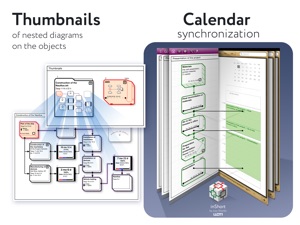
• Integration with the standard Calendar.
• Displaying the list of project tasks in the form of a Gantt chart. 
• Separation of physical and information flows of the project. 
• Ability to specify the expected time of execution, both directly and parametrically.
• Export of charts into PDF files and OPML outlines.
• Project management according to the methodology of the Theory of Constraints. 
• Working calendars taking into account various schedules of work for implementation of tasks. 
• Work resources and their assignment to tasks. 
• Queues of tasks: organize the work with active tasks in accordance with the elements of the GTD methodology.
• Checklists for diagrams — monitor the sequence of actions for project management step by step.
Advanced features of project management in accordance with the Theory of Constraints technique:
• finding the critical path;
• positioning of time buffers of the project;
• calculation of buffer sizes;
• calculation of late starts for feeding paths of the project;
• tracking of time indicators during project execution.
***
inShort Pro — application version for experienced and advanced users, contains advanced and service functions useful for in-depth work with diagrams.
Functions included in inShort Pro:
• Working with layers of diagrams;
• inReview: publications of user diagrams surveys by experienced project managers, indicating successful findings and weaknesses in the diagrams. The procedure for sending diagrams for analysis is described in the Terms of Use.
The inShort Pro version is available by monthly subscription. Subscription automatically renews unless auto-renew is turned off at least 24 hours before the end of the current period.
inShort Pro Subscription Terms of Use link: http://www.shortki.com/inShort/proTerms.html
***
Cannot solve a problem? Draw it inShort and sort things out with it there. It's like voodoo but it works.

Novità nella versione 9.0

• Expanded and improved WFL export format.
• Fixed compatibility bugs.
Introducing inShort² for iOS, tons of new features, plus an improved mobile application interface!

Rivenditore

Nome

Iouri Korotkikh

Informazioni

Sviluppatore

Versione

9.0

Dimensione

57,1 MB

Game Center

No

VPP Device Licensing

Classifica

Classificazione: 4+

Compatibilità

iOS 9.0 o successivo

Dispositivi

iPhone 5s, iPhone 6, iPhone 6 Plus, iPhone 6s, iPhone 6s Plus, iPhone SE, iPhone 7, iPhone 7 Plus, iPhone 8, iPhone 8 Plus, iPhone X, iPhone XR, iPhone XS, iPhone XS Max, iPhone 11, iPhone 11 Pro, iPhone 11 Pro Max, iPhone SE (2a generazione), iPhone 12, iPhone 12 Pro, iPhone 12 Pro Max, iPhone 12 mini, iPhone 13, iPhone 13 Pro, iPhone 13 Pro Max, iPhone 13 mini, iPhone SE (3a generazione), iPhone 14, iPhone 14 Plus, iPhone 14 Pro, iPhone 14 Pro Max, iPhone 15, iPhone 15 Plus, iPhone 15 Pro, iPhone 15 Pro Max, iPhone 16, iPhone 16 Plus, iPhone 16 Pro, iPhone 16 Pro Max, iPhone 16e, iPhone 17, iPhone 17 Pro, iPhone 17 Pro Max, iPhone Air, iPhone 17e, iPad (5ª generazione) Wi-Fi, iPad (5ª generazione) Wi-Fi + Cellular, iPad (6a generazione) Wi-Fi, iPad (6a generazione) Wi-Fi + Cellular, iPad Pro, iPad Pro (Cellular), iPad Pro (9,7 pollici), iPad Pro (9,7 pollici) (Cellular), iPad Pro da 12,9 pollici (2a generazione), iPad Pro da 12,9 pollici (2a generazione) Wi-Fi + Cellular, iPad Pro da 10,5 pollici, iPad Pro da 10,5 pollici Wi-Fi + Cellular, iPad Pro da 11 pollici, iPad Pro da 11 pollici Wi-Fi + Cellular, iPad Pro da 12,9 pollici (3a generazione), iPad Pro da 12,9 pollici (3a generazione) Wi-Fi + Cellular, iPad Air, iPad Air (Cellular), iPad Air 2, iPad Air 2 (Cellular), iPad Air (terza generazione), iPad Air (terza generazione) Wi-Fi + Cellular, iPad mini Retina, iPad mini Retina (Cellular), iPad mini 3, iPad mini 3 (Cellular), iPad mini 4, iPad mini 4 (Cellular), iPad mini (5ª generazione), iPad mini (5ª generazione) Wi-Fi + Cellular, iPad (7ª generazione) Wi-Fi + Cellular, iPad Pro da 11 pollici (2a generazione), iPad Pro da 11 pollici (2a generazione) Wi-Fi + Cellular, iPad Pro da 12,9 pollici (4a generazione), iPad Pro da 12,9 pollici (4a generazione) Wi-Fi + Cellular, iPad Air (4ª generazione) (Wi-Fi), iPad Air (4ª generazione) (Wi-Fi + Cellular), iPad (8ª generazione) Wi-Fi, iPad (8ª generazione) Wi-Fi + Cellular, iPad Pro da 11 pollici (3a generazione), iPad Pro da 11 pollici (3a generazione) Wi-Fi + Cellular, iPad Pro da 12,9 pollici (5ª generazione), iPad Pro da 12,9 pollici (5ª generazione) Wi-Fi + Cellular, iPad (9ª generazione), iPad (9ª generazione) Wi-Fi + Cellular, iPad mini (6ª generazione), iPad mini (6ª generazione) Wi-Fi + Cellular, iPad Air (5a generazione), iPad Air (5a generazione) Wi-Fi + Cellular, iPad Pro da 11 pollici (4a generazione), iPad Pro da 11 pollici (4a generazione) Wi-Fi + Cellular, iPad Pro da 12,9 pollici (6a generazione), iPad Pro da 12,9 pollici (6a generazione) Wi-Fi + Cellular, iPad (10a generazione), iPad (10a generazione) Wi-Fi + Cellular, iPad Air da 11 pollici (M2) Wi-Fi, iPad Air da 13 pollici (M2) Wi-Fi, iPad Air da 13 pollici (M2) Wi-Fi + Cellular, iPad Pro da 11 pollici (M4) Wi-Fi, iPad Pro da 11 pollici (M4) Wi-Fi + Cellular, iPad Pro da 13 pollici (M4) Wi-Fi, iPad Pro da 13 pollici (M4) Wi-Fi + Cellular, iPad mini (A17 Pro) Wi-Fi, iPad mini (A17 Pro) Wi-Fi + Cellular, iPad (A16) Wi-Fi, iPad (A16) Wi-Fi + Cellular, iPad Air da 11 pollici (M3) Wi-Fi, iPad Air da 11 pollici (M3) Wi-Fi + Cellular, iPad Air da 13 pollici (M3) Wi-Fi, iPad Air da 13 pollici (M3) Wi-Fi + Cellular, iPad Pro da 11 pollici (M5) Wi-Fi, iPad Pro da 11 pollici (M5) Wi-Fi + Cellular, iPad Pro da 13 pollici (M5) Wi-Fi, iPad Pro da 13 pollici (M5) Wi-Fi + Cellular, iPad Air da 11 pollici (M4) Wi-Fi, iPad Air da 11 pollici (M4) Wi-Fi + Cellular, iPad Air da 13 pollici (M4) Wi-Fi, iPad Air da 13 pollici (M4) Wi-Fi + Cellular, iPod touch (sesta generazione), iPod touch (7ª generazione)

Lingue

cinese, francese, inglese, russo, tedesco

App Store: Valutazione dei clienti

Valutazioni e recensioni

4,0 di 5 (5 valutazioni)

App Store: Recensioni clienti

2019-11-23

Sincro Cloud

A quanto il sincro su cloud???
Fabriace
Versione 7.5
2019-05-25

Complicato ma altamente professionale

Non ho ancora iniziato ad usarlo ma solo a leggere il tutorial. Mi riservo di integrare, quanto scritto e votato, quando avrò imparato ad usarlo.
Dozaf
Versione 7.2
2017-03-08

Geniale

Per sfruttarla appieno è quasi obbligatoria la lettura dell'ottima User Guide (disponibile come PDF nelle Settings), che tuttavia è scritto molto bene e guida anche il neofita dalle basi ai concetti più complessi di project management. Una volta apprese tutte le funzioni è possibile gestire anche progetti con moltissimi livelli di complessità e team anche numerosi (con calendari personalizzabili per ciascuna risorsa umana), avendo sempre un quadro chiaro e comprensibile dell'intero progetto, ed è proprio questo il punto di forza che non ho riscontrato in nessuna altra app mobile. Richiede tempo per cominciare ma che sarà molto ben ripagato.
Nick '79
Versione 5.4.9
2017-01-02

Flexible and powerful.

Don't think this is the usual Gantt chart planning app. It is actually much more comprehensive, with stochastic variables, resources, time buffers between tasks, yes/no nodes and so on.
For advanced project management, it will take you some time to master it.
Giovanni - Milano
Versione 5.4.8
2016-07-22

Sicuramente mi sarà molto utile.

Iniziato ad usare. Sembra molto utile, funzionale, interessante, rispecchia meglio le esigenze nella realizzazione di un progetto.
MarcoD80
Versione 5.4.2
2015-11-06

Ultimo aggiornamento

Non funziona più.
iMarco 69
Versione 5.3.1
2014-05-16

Potente

Abbastanza complicato capire tutte le funzionalità e i comandi, ma quando fai un po' di pratica, anche seguendo il tutorial, risulta davvero notevole per pianificare e schematizzare.
Simon Wheel
Versione 5.0.2
2013-08-28

Good

Not easy, but useful. Thanks. Really help!!! Even better in the iP5, perfect for iPad.
Pi Ya Dan
Versione 4.4.7
2011-12-26

Geniale

Effettivamente da capire bene, specialmente i condizionali, ma per il resto notevole.
Cassy cash
Versione 3.2.3