Aggiornamento

Speedometer 55 Pro. GPS kit.
Data release: 2012-06-10
© blocoware


-2
n.82 in Top app acquistate > Navigazione
±0
n.48 in Top app aquistate per iPad > Navigazione
Istantanee iPhone


Istantanee iPad






Descrizione
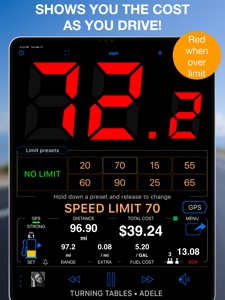
A premium speedometer, GPS tracker, and trip cost monitor for iPhone and cellular iPad. Stay informed and in control while you drive. When you exceed a preset speed limit, the large digits turn from green to red with a sound alert. Track trip costs in real-time and split expenses with passengers. Record your trips for easy review, analysis, or sharing.
Features:
■ Cost & Fuel Monitor
Monitor your driving costs in real-time. Enter fuel price and efficiency (US/UK MPG or L/100 km), plus optional extra charges per mile or kilometer. Ideal for cost-conscious drivers and fare splitting. Includes a fuel monitor and range alerts — helpful if your fuel gauge is unreliable.
■ GPS Tracking
Keep detailed track of your mileage! Start GPS track recording via MENU > NEW TRACK and stop it with MENU > STOP TRACK. You can re-trace previously recorded tracks by adding them back to the map. Export/import tracks in GPX, KML, or KMZ formats.
■ Mileage Calculator
Pre-calculate distance, fuel costs, and mileage between addresses. Save the route as a track or a set of trips for specific days and times. Useful for filling gaps in mileage logs.
■ PDF Mileage Reports
Convert mileage and trip data into customizable, professional reimbursement reports.
■ Speed Limits & Memory
Set speed limits with 4 or 8 one-tap presets. The app can optionally remember where each limit was used and re-apply them automatically.
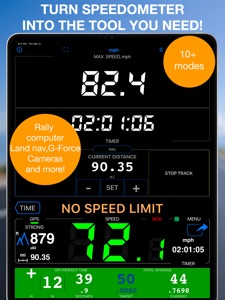
■ Modes (MENU > MODES)
• Default (speed + trip computer)
• Full-screen speed display (huge digits in landscape)
• Mirrored heads-up display (HUD) for windshield reflection
• Rally computer
• G-Force monitor
• Camera and waypoint alerter
• Taximeter
• Map display and full-screen map
• Water sports mode (includes sunset countdown and alert)
• Idle timer mode (alerts when idling)
• Paragliding mode (barometric speed and altitude)
• Land, air, and marine navigation (with directional arrow to a target waypoint or along route)
■ Waypoints
With optional photo or audio recording. Alert on approach or apply speed limit. Export/import in CSV, GPX, KML, KMZ formats.
■ Red Light & Speed Cameras
Import camera data or use the built-in library. Alerts you on camera approach and auto-sets speed limits.
■ Barometric VSI
Displays real-time vertical speed based on barometric data.
■ Barometric Altimeter
Supports QFE/QNH settings.
■ Voice Coach
Hear distance, duration, speed, and altitude updates at set intervals.
■ Maps
Choose Google, Apple, blank, or offline maps (road, satellite, topographic). Import maps in MBTiles or SQLiteDB formats, or download offline maps within the app. Add ground overlays from KMZ files or create your own within the app, annotate and share.
■ Siri Shortcuts
Control the app with voice commands. Start or stop tracking, set speed limits.
■ Speed & Distance Information
Displays speed range from 0 to 999. Supports MPH, km/h, and knots. Shows max/average speed, distance, altitude, and sunrise/sunset times.
■ Background Mode
Runs in the background (if enabled or when GPS tracking is active). You can use other apps while Speedometer 55 PRO runs.
■ Auto-Recording (Optional)
Automatically logs driving activities without manual start or stop. No need to keep the app open. Configure once to track mileage for tax or reimbursement purposes. Includes 50 free auto-tracks per month. Upgrade for unlimited auto-tracking.
■ Privacy
Your location data stays private. It is used only for speed monitoring and trip recording within the app—never shared with third parties.
■ Compatibility
Works on iPhone and cellular iPad. Not compatible with iPods or Wi-Fi-only (non-cellular) iPads. As with any GPS app, background usage may lead to faster battery consumption.
Drive smarter and safer. Track your trips, calculate costs, and avoid speeding fines. The perfect companion for commuting, travel, or business.
Terms of Use:
https://www.apple.com/legal/internet-services/itunes/dev/stdeula/
Novità nella versione 6.1
■ Pitch & Roll
‣ Pitch & Roll panels now include motorcycle and airplane image options. Choose them from the panel settings.
■ Map and Track Improvements
‣ Active track line width is now configurable in Map Settings. The thinnest line is now the default for better map visibility.
‣ The purple tail is now called Location breadcrumb. It is hidden from the map menu while recording, and now starts off by default to avoid confusion.
■ Channels replace GPS Beacons
‣ Channels are the new way to share live location while tracking. Share by private web link with optional password protection, or use a shared group channel where members can follow each other in the app or on the web.
‣ Channels are off by default. Your location is shared only when you turn sharing on for an active or joined channel while track recording is running and not paused.
‣ Channels do not require an account or registration. They expire automatically after idling, and the creator can delete them at any time.
■ Voice Coach and Navigation Hints
‣ Voice Coach and navigation hints now work together in one clearer setup. Configure regular coach announcements, on-course guidance, spoken target distance and bearing, and relative or absolute spoken bearings from the same place.
‣ Voice Coach can now include target navigation guidance in regular time or distance interval announcements, telling distance and bearing to the current target when one is active.
‣ New absolute spoken bearing guidance lets you keep the iPhone in your pocket and navigate by voice hints while holding a magnetic compass in your hand.
‣ Huge thanks to Steve for suggesting absolute bearing voice guidance and testing it in the wild.
■ Fixes and Compatibility
‣ Improved KML and KMZ export/import compatibility, including more reliable fallback handling for waypoint descriptions and notes.
‣ General Sound Settings now include a new option to explicitly select which device voice is used for voice guidance and announcements.
‣ Fixed issues with the course line after returning from background, the export file name pattern editor on iOS 17, and a rare Trips & Tracks filter crash on iOS 15.
Rivenditore
Nome
Stanislav Dvoychenko
Informazioni
Sviluppatore
Categorie
Versione
6.1
Dimensione
85,2 MB
Game Center
No
VPP Device Licensing
Sì
Classifica
Classificazione: 4+
Compatibilità
iOS 15.6 o successivo
Dispositivi
iPhone 5s, iPhone 6, iPhone 6 Plus, iPhone 6s, iPhone 6s Plus, iPhone SE, iPhone 7, iPhone 7 Plus, iPhone 8, iPhone 8 Plus, iPhone X, iPhone XR, iPhone XS, iPhone XS Max, iPhone 11, iPhone 11 Pro, iPhone 11 Pro Max, iPhone SE (2a generazione), iPhone 12, iPhone 12 Pro, iPhone 12 Pro Max, iPhone 12 mini, iPhone 13, iPhone 13 Pro, iPhone 13 Pro Max, iPhone 13 mini, iPhone SE (3a generazione), iPhone 14, iPhone 14 Plus, iPhone 14 Pro, iPhone 14 Pro Max, iPhone 15, iPhone 15 Plus, iPhone 15 Pro, iPhone 15 Pro Max, iPhone 16, iPhone 16 Plus, iPhone 16 Pro, iPhone 16 Pro Max, iPhone 16e, iPhone 17, iPhone 17 Pro, iPhone 17 Pro Max, iPhone Air, iPhone 17e, iPad (5ª generazione) Wi-Fi, iPad (5ª generazione) Wi-Fi + Cellular, iPad (6a generazione) Wi-Fi, iPad (6a generazione) Wi-Fi + Cellular, iPad Pro, iPad Pro (Cellular), iPad Pro (9,7 pollici), iPad Pro (9,7 pollici) (Cellular), iPad Pro da 12,9 pollici (2a generazione), iPad Pro da 12,9 pollici (2a generazione) Wi-Fi + Cellular, iPad Pro da 10,5 pollici, iPad Pro da 10,5 pollici Wi-Fi + Cellular, iPad Pro da 11 pollici, iPad Pro da 11 pollici Wi-Fi + Cellular, iPad Pro da 12,9 pollici (3a generazione), iPad Pro da 12,9 pollici (3a generazione) Wi-Fi + Cellular, iPad Air, iPad Air (Cellular), iPad Air 2, iPad Air 2 (Cellular), iPad Air (terza generazione), iPad Air (terza generazione) Wi-Fi + Cellular, iPad mini Retina, iPad mini Retina (Cellular), iPad mini 3, iPad mini 3 (Cellular), iPad mini 4, iPad mini 4 (Cellular), iPad mini (5ª generazione), iPad mini (5ª generazione) Wi-Fi + Cellular, iPad (7ª generazione) Wi-Fi + Cellular, iPad Pro da 11 pollici (2a generazione), iPad Pro da 11 pollici (2a generazione) Wi-Fi + Cellular, iPad Pro da 12,9 pollici (4a generazione), iPad Pro da 12,9 pollici (4a generazione) Wi-Fi + Cellular, iPad Air (4ª generazione) (Wi-Fi), iPad Air (4ª generazione) (Wi-Fi + Cellular), iPad (8ª generazione) Wi-Fi, iPad (8ª generazione) Wi-Fi + Cellular, iPad Pro da 11 pollici (3a generazione), iPad Pro da 11 pollici (3a generazione) Wi-Fi + Cellular, iPad Pro da 12,9 pollici (5ª generazione), iPad Pro da 12,9 pollici (5ª generazione) Wi-Fi + Cellular, iPad (9ª generazione), iPad (9ª generazione) Wi-Fi + Cellular, iPad mini (6ª generazione), iPad mini (6ª generazione) Wi-Fi + Cellular, iPad Air (5a generazione), iPad Air (5a generazione) Wi-Fi + Cellular, iPad Pro da 11 pollici (4a generazione), iPad Pro da 11 pollici (4a generazione) Wi-Fi + Cellular, iPad Pro da 12,9 pollici (6a generazione), iPad Pro da 12,9 pollici (6a generazione) Wi-Fi + Cellular, iPad (10a generazione), iPad (10a generazione) Wi-Fi + Cellular, iPad Air da 11 pollici (M2) Wi-Fi, iPad Air da 13 pollici (M2) Wi-Fi, iPad Air da 13 pollici (M2) Wi-Fi + Cellular, iPad Pro da 11 pollici (M4) Wi-Fi, iPad Pro da 11 pollici (M4) Wi-Fi + Cellular, iPad Pro da 13 pollici (M4) Wi-Fi, iPad Pro da 13 pollici (M4) Wi-Fi + Cellular, iPad mini (A17 Pro) Wi-Fi, iPad mini (A17 Pro) Wi-Fi + Cellular, iPad (A16) Wi-Fi, iPad (A16) Wi-Fi + Cellular, iPad Air da 11 pollici (M3) Wi-Fi, iPad Air da 11 pollici (M3) Wi-Fi + Cellular, iPad Air da 13 pollici (M3) Wi-Fi, iPad Air da 13 pollici (M3) Wi-Fi + Cellular, iPad Pro da 11 pollici (M5) Wi-Fi, iPad Pro da 11 pollici (M5) Wi-Fi + Cellular, iPad Pro da 13 pollici (M5) Wi-Fi, iPad Pro da 13 pollici (M5) Wi-Fi + Cellular, iPad Air da 11 pollici (M4) Wi-Fi, iPad Air da 11 pollici (M4) Wi-Fi + Cellular, iPad Air da 13 pollici (M4) Wi-Fi, iPad Air da 13 pollici (M4) Wi-Fi + Cellular, iPod touch (sesta generazione), iPod touch (7ª generazione)
Lingue
cinese, coreano, francese, giapponese, inglese, polacco, portoghese, russo, spagnolo, tedesco, turco
App Store: Valutazione dei clienti
Valutazioni e recensioni
4,8 di 5 (15 valutazioni)
App Store: Recensioni clienti
Nessuna voce