InformazioniTerminiPrivacyContatto
 
Aggiornamento
1Writer - Markdown Text Editor

1Writer - Markdown Text Editor

Data release: 2013-08-14
© 2025 Ngoc Luu
1Writer - Markdown Text Editor - QR Code
Versione 3.3.8
17+
Scarica su App Store
Versione 3.3.8
17+
Scarica su App Store
Data release: 2013-08-14
© 2025 Ngoc Luu

Istantanee iPhone

Screenshot
Screenshot
Screenshot
Screenshot
Screenshot
Screenshot
Screenshot
Screenshot
Screenshot

Istantanee iPad

Screenshot
Screenshot
Screenshot
Screenshot
Screenshot
Screenshot
Screenshot
Screenshot
Screenshot

Descrizione

1Writer combines all the basic text editing features you would expect with all the advanced features you will ever need. Use 1Writer to write, research, revise, and share your ideas with maximum efficiency.
- - - - - - - - - -
"The only Dropbox- and Markdown-enabled text editor for iPhone that’s clicked with me has been 1Writer. It’s simple, looks great, and gets the job done." - TheSweetSetup.com
"Really great app, really recommend it." - Federico Viticci, MacStories.net
"The app interface is beautiful and distraction-free, with loads of other awesome features lurking beneath its simple exterior. It's now my go-to iPhone text editor." - Chris Gonzales, ToolsandToys.net
"For users that want a great visual experience paired with great support for custom actions and third party apps, 1Writer is an excellent choice." - iMore.com
"1Writer is the most powerful text editor available for iPhone." - Phillip Gruneich
- - - - - - - - - -
CREATE
- Write :: generate and edit plain text or Markdown files.
- Preview :: see the formatted results with Markdown syntax highlighting while you write and a full, rich-text preview when you're done.
- Extended keyboard :: a convenient row of buttons for navigation, formatting, special characters (customizable--pick the characters you use the most).
- Insert photo :: pick a photo or take a new one, and 1Writer will upload it to Dropbox and generate the Markdown-syntax to add it to your document--all in a single action!
- Snippets :: TextExpander Touch support.
- Custom URL actions :: insert a document template, encode a selection and replace the original text, look up synonyms and much more.
- JavaScript :: create even more powerful custom actions using JavaScript—text manipulation, perform a find & replace, interact with the clipboard—the possibilities are endless.
IMPORT
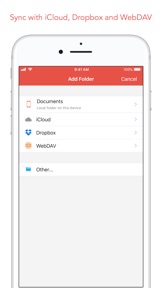
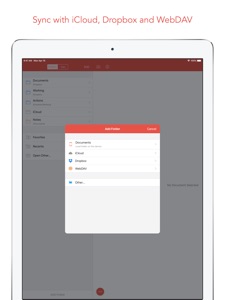
- Sync with iCloud, Dropbox and WebDAV.
- Share extension :: send text to 1Writer from other apps. In Safari, the extension uses the current URL, page title and selected text to create a new document.
- Create, append, prepend, or replace text directly from other apps using the 1Writer URL scheme.
EXPORT
- CloudApp and Dropbox :: generate a link to share your document in plain text or PDF.
- Evernote :: pick your notebook, add tags and turn a text selection or the entire document into a new, rich-text note.
- Copy HTML :: put the formatted text for your document directly on the clipboard.
- Custom actions :: open a web search, tweet a selection, save a series of items in a list and much more.
PERSONALIZE
- Support Dark Mode on iOS 13.
- 2 dark themes for more comfortable reading and writing at night.
- Choose from 20 different fonts.
- Bookmark and sync the Dropbox/WebDAV folders you want to have quick access to the sub-folders and documents you need.
- Use a passcode or Touch ID/Face ID to protect the app from unauthorized users.
RESEARCH
- In-app web browser :: research, look up information without having to leave the app.
- Bookmarks :: create and access your favorite websites.
- Save the current text selection to the clipboard in Markdown syntax.
- 1Password support :: login to all your accounts using the 1Password extension.
EVEN MORE GREAT FEATURES
- Drag and drop.
- Open in Place.
- Multiple windows on iOS 13.
- MultiMarkdown.
- Search documents from Spotlight.
- Find & replace within document.
- Photo and PDF preview.
- Today widget :: access your recent documents from the Notification Center or create a new document in one tap.
- Checklist support :: create a list of things to do or topics to research, and easily check them off.
- Full-text search and hashtag support :: search within a folder to find the document you need, and view related documents that have the same tag.

Novità nella versione 3.3.8

Bug fixes.

Rivenditore

Nome

Ngoc Luu

URL

Informazioni

Sviluppatore

Versione

3.3.8

Dimensione

19,7 MB

Game Center

No

VPP Device Licensing

Classifica

Valutato 17+ per:
Accesso web senza restrizioni

Compatibilità

iOS 13.0 o successivo

Dispositivi

iPhone 5s, iPhone 6, iPhone 6 Plus, iPhone 6s, iPhone 6s Plus, iPhone SE, iPhone 7, iPhone 7 Plus, iPhone 8, iPhone 8 Plus, iPhone X, iPhone XR, iPhone XS, iPhone XS Max, iPhone 11, iPhone 11 Pro, iPhone 11 Pro Max, iPhone SE (2a generazione), iPhone 12, iPhone 12 Pro, iPhone 12 Pro Max, iPhone 12 mini, iPhone 13, iPhone 13 Pro, iPhone 13 Pro Max, iPhone 13 mini, iPhone SE (3a generazione), iPhone 14, iPhone 14 Plus, iPhone 14 Pro, iPhone 14 Pro Max, iPhone 15, iPhone 15 Plus, iPhone 15 Pro, iPhone 15 Pro Max, iPhone 16, iPhone 16 Plus, iPhone 16 Pro, iPhone 16 Pro Max, iPhone 16e, iPhone 17, iPhone 17 Pro, iPhone 17 Pro Max, iPhone Air, iPhone 17e, iPad (5ª generazione) Wi-Fi, iPad (5ª generazione) Wi-Fi + Cellular, iPad (6a generazione) Wi-Fi, iPad (6a generazione) Wi-Fi + Cellular, iPad Pro, iPad Pro (Cellular), iPad Pro (9,7 pollici), iPad Pro (9,7 pollici) (Cellular), iPad Pro da 12,9 pollici (2a generazione), iPad Pro da 12,9 pollici (2a generazione) Wi-Fi + Cellular, iPad Pro da 10,5 pollici, iPad Pro da 10,5 pollici Wi-Fi + Cellular, iPad Pro da 11 pollici, iPad Pro da 11 pollici Wi-Fi + Cellular, iPad Pro da 12,9 pollici (3a generazione), iPad Pro da 12,9 pollici (3a generazione) Wi-Fi + Cellular, iPad Air, iPad Air (Cellular), iPad Air 2, iPad Air 2 (Cellular), iPad Air (terza generazione), iPad Air (terza generazione) Wi-Fi + Cellular, iPad mini Retina, iPad mini Retina (Cellular), iPad mini 3, iPad mini 3 (Cellular), iPad mini 4, iPad mini 4 (Cellular), iPad mini (5ª generazione), iPad mini (5ª generazione) Wi-Fi + Cellular, iPad (7ª generazione) Wi-Fi + Cellular, iPad Pro da 11 pollici (2a generazione), iPad Pro da 11 pollici (2a generazione) Wi-Fi + Cellular, iPad Pro da 12,9 pollici (4a generazione), iPad Pro da 12,9 pollici (4a generazione) Wi-Fi + Cellular, iPad Air (4ª generazione) (Wi-Fi), iPad Air (4ª generazione) (Wi-Fi + Cellular), iPad (8ª generazione) Wi-Fi, iPad (8ª generazione) Wi-Fi + Cellular, iPad Pro da 11 pollici (3a generazione), iPad Pro da 11 pollici (3a generazione) Wi-Fi + Cellular, iPad Pro da 12,9 pollici (5ª generazione), iPad Pro da 12,9 pollici (5ª generazione) Wi-Fi + Cellular, iPad (9ª generazione), iPad (9ª generazione) Wi-Fi + Cellular, iPad mini (6ª generazione), iPad mini (6ª generazione) Wi-Fi + Cellular, iPad Air (5a generazione), iPad Air (5a generazione) Wi-Fi + Cellular, iPad Pro da 11 pollici (4a generazione), iPad Pro da 11 pollici (4a generazione) Wi-Fi + Cellular, iPad Pro da 12,9 pollici (6a generazione), iPad Pro da 12,9 pollici (6a generazione) Wi-Fi + Cellular, iPad (10a generazione), iPad (10a generazione) Wi-Fi + Cellular, iPad Air da 11 pollici (M2) Wi-Fi, iPad Air da 13 pollici (M2) Wi-Fi, iPad Air da 13 pollici (M2) Wi-Fi + Cellular, iPad Pro da 11 pollici (M4) Wi-Fi, iPad Pro da 11 pollici (M4) Wi-Fi + Cellular, iPad Pro da 13 pollici (M4) Wi-Fi, iPad Pro da 13 pollici (M4) Wi-Fi + Cellular, iPad mini (A17 Pro) Wi-Fi, iPad mini (A17 Pro) Wi-Fi + Cellular, iPad (A16) Wi-Fi, iPad (A16) Wi-Fi + Cellular, iPad Air da 11 pollici (M3) Wi-Fi, iPad Air da 11 pollici (M3) Wi-Fi + Cellular, iPad Air da 13 pollici (M3) Wi-Fi, iPad Air da 13 pollici (M3) Wi-Fi + Cellular, iPad Pro da 11 pollici (M5) Wi-Fi, iPad Pro da 11 pollici (M5) Wi-Fi + Cellular, iPad Pro da 13 pollici (M5) Wi-Fi, iPad Pro da 13 pollici (M5) Wi-Fi + Cellular, iPad Air da 11 pollici (M4) Wi-Fi, iPad Air da 11 pollici (M4) Wi-Fi + Cellular, iPad Air da 13 pollici (M4) Wi-Fi, iPad Air da 13 pollici (M4) Wi-Fi + Cellular, iPod touch (sesta generazione), iPod touch (7ª generazione)

Lingue

cinese, giapponese, inglese, tedesco

App Store: Valutazione dei clienti

Valutazioni e recensioni

4,7 di 5 (22 valutazioni)

App Store: Recensioni clienti

2023-07-18

Lo uso da anni, sempre perfetto

Ottima App, rapida anche su un iPhone vecchissimo, mai un problema, fa quello che deve senza abbonamenti o altre scocciature.
manuelmagic9
Versione 1.3
2021-06-27

Perplesso

App a pagamento e interpreta male i block code … anche le app più scarse e gli editor gratuiti non hanno problemi. Io scrivo prevalentemente file md con molto codice, così é inutilizzabile. Peccato soldi spesi male.
Maronno
Versione 1.3.1
2021-03-10

Perfetta

Note che vengono salvate come testo puro nel mio Dropbox, senza dovermi legare a un formato proprietario come nel caso dell’app standard Note. Ottimo supporto anche da tastiera Bluetooth e perfetta sincronizzazione. Unico piccolissimo difetto è che la posizione del cursore in edit non è la stessa della modalità preview. Aggiungerei il supporto a note cifrate con password
Ricibald
Versione 2.7
2020-12-17

Un piccolo capolavoro

Impareggiabile, semplicità e versatilità coniugate in modo magistrale
alek otk
Versione 3.1
2020-10-23

Utilissima!

Peccato solo non venga sviluppata ulteriormente e non dia l’accesso ad altri servizi cloud.
fbatta
Versione 3.0.1
2019-09-29

Excellent program

Rich yet easy to figure out, simple yet extremely powerful. One senses that it was thought out very well. Customer service is real fast and friendly and of course HELPFUL. Definitely a keeper!
I've been using it a couple of years already... and the five-star rating remains, however I wish this brilliant app maker would embrace the joys of connective editing!
Steven Luotto
Versione 3.2
2017-10-10

Quasi perfetta

L'app é fulminea, l'integrazione con Dropbox perfetta e il supporto al markdown ottimo.
Mi piace molto anche la grafica asciutta, baremetal che si presenta nella sua efficienza solo al bisogno.
Sembra ideale per tornare a prendere note sul mio vecchio Ipad
stefanozannoni
Versione 3.3
2016-02-17

Un solo difetto: è troppo "mobile"

Sì perché senza la versione desktop si interrompe la splendida esperienza che si ha in iOS.
Detto questo, è una delle poche app che uso sin dalla sua comparsa e che non mi ha mai delusa. Facile il setting, ottima la personalizzazione del testo dalle font alle spaziature, completo il supporto a Markdown, chiara ed elegante la preview e graziosa la GUI. Poi arriva il plus grazie alle numerose azioni che la rendono quasi un editor di testo per power user anche quando power non lo sei davvero. Insomma… ottimo lavoro, ottima app. 🤓
Un solo appunto (Mac companion a parte 😤): lo schema colori dei temi non mi piace 😒Si potrebbero aggiungere altre nuance più "acide" da aggiungere alle attuali? 😋
alsoknownasBi
Versione 3.3.1
2014-08-30

Mac app!!

Release the Mac app for 5 stars!!
-- A.B.
Versione 2.2.2
2014-04-02

Ottima app

Funzionale e dal bellissimo design!
Complimenti :)
Luca ⚓
Versione 3.3.6
2014-03-20

Fantastica

Veloce, comoda ed intuitiva molto buona
La consiglio a tutti quelli che prendono sempre appunti al volo.
Antonio.dancona
Versione 1.4.2