InformazioniTerminiPrivacyContatto
 
Aggiornamento
QuickPlan - Project Gantt Plan

QuickPlan - Project Gantt Plan

Data release: 2013-10-20
© 2013 ~ 2026 Swift Apps Group
QuickPlan - Project Gantt Plan - QR Code
Versione 17.3
4+
Scarica su App Store
Versione 17.3
4+
Scarica su App Store
Data release: 2013-10-20
© 2013 ~ 2026 Swift Apps Group

Istantanee iPhone

Screenshot
Screenshot
Screenshot
Screenshot
Screenshot
Screenshot
Screenshot
Screenshot
Screenshot
Screenshot

Descrizione

Project management with natural gestures on the Gantt chart designed for small touchscreens. Sync projects across multiple devices, and share projects in teams AND supports Microsoft Project Plan integration.
## PRIVACY FOCUSED:
User-created projects are stored on the user's device or in iCloud Drive, whichever the user chooses.
*** This app is ONLY for iPhone ***
QuickPlan has separate apps for iPhone and iPad. You can save money by buying the app for one device only, or pay the same price for both devices.
* Feature Video https://youtu.be/Ean-OpZkhEQ
* No In-App Purchases.
* QuickPlan is now available for macOS (Free 15-day trial is at https://quickplan.app/trial).
QuickPlan makes project planning more convenient than ever. NATURAL GESTUREs and keyboard shortcuts are used in a clean and elegant interface that makes project management more accessible, faster and more efficient than ever before. Visualize, manage and simplify projects in Gantt charts, structure tasks in a tree structure, organize your project calendar and resources, track task status. It's easier than you think, all at your fingertips with a minimum of effort and learning.
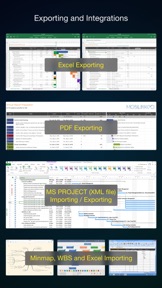
QuickPlan supports exporting projects to image, Excel, PDF, Microsoft Project and WBS files and importing projects from Microsoft Project (in XML format), WBS, Mindmap, and Excel files. Plans can be synchronized with multiple devices via iCloud Drive. They can be shared with other users and devices via AirDrop, email, and the iOS Files app.
QuickPlan optimizes the best features of Microsoft Project Plan and makes them work for iPhone - without the complexity. We bring INTUITIVE and discoverable project management to users of all experience levels.
## EFFICIENT MAINTENANCE
- Gestures for tasks: create, remove, move, indent and outdent, change order.
- Gestures to zoom in and out, collapse and expand.
- Dynamic context menu system makes scheduling a reality on a small touch screen
- Batch input
- The most fluid Gantt chart app on a clean interface.
- Context-based editing of outline, Gantt chart and inspectors.
## STRONG PLANNING
- Multiple projects in groups, with support for duplication.
- Organize tasks into REAL task groups and sub-projects.
- Task color, icon, contact, URLs, and other necessary task fields.
- Five outline levels (plus sub-project, for a total of ten outline levels).
. Gesture-based management of task links.
. Project currency, charge rate, project resource, calendar, task date policy.
## TREE and LIST
- Rendering as a tree with support for key path display.
- Rendering as a list with support for sorting and filtering.
## UI CUSTOMIZATION
- Customization of the task column title and visibility.
- Style of the task bar.
## REPORTING
- Export as image, PDF, and Microsoft Excel (including three sheets).
- With options to customize the output.
## SYNC
- Sync projects between iOS and Mac devices via iCloud Drive, OneDrive, and Dropbox.
## INTEGRATION
- Export and import Microsoft Project XML files.
- Import and export SwiftApp WBS files.
- Import from Microsoft Excel files.
- Import from iThought Map files.
## SHARE
- Supports Airdrop, OneDrive, Dropbox.
## TEAM
- Supports creating a sub-plan for specific project members.
- The sub-plan contains only the tasks for the specific members.
## NOTIFICATION
- Widget to track ongoing tasks (iOS 14 or later).
- Today widget and Local Notification.
QuickPlan simplifies the complexity of project planning that sets ease as the ultimate goal in organizing your professional projects, plans, efforts, goals and life. The best project planning app for iPhone
- Initialize, discuss, present and share your plan, and export it to Microsoft Project Plan for future work.
- Strategic Planning
- Import MS Project file (in XML format) and reports, tracking.
- Plan new ideas
- Agree and confirm actions in meetings
- Discuss, plan and assign tasks
- Track project progress

Novità nella versione 17.3

Bug fixes and performance improvements.

Informazioni

Sviluppatore

Versione

17.3

Dimensione

203,1 MB

Game Center

No

VPP Device Licensing

Classifica

Classificazione: 4+

Compatibilità

iOS 18.2 o successivo

Dispositivi

iPhone 5s, iPhone 6, iPhone 6 Plus, iPhone 6s, iPhone 6s Plus, iPhone SE, iPhone 7, iPhone 7 Plus, iPhone 8, iPhone 8 Plus, iPhone X, iPhone XR, iPhone XS, iPhone XS Max, iPhone 11, iPhone 11 Pro, iPhone 11 Pro Max, iPhone SE (2a generazione), iPhone 12, iPhone 12 Pro, iPhone 12 Pro Max, iPhone 12 mini, iPhone 13, iPhone 13 Pro, iPhone 13 Pro Max, iPhone 13 mini, iPhone SE (3a generazione), iPhone 14, iPhone 14 Plus, iPhone 14 Pro, iPhone 14 Pro Max, iPhone 15, iPhone 15 Plus, iPhone 15 Pro, iPhone 15 Pro Max, iPhone 16, iPhone 16 Plus, iPhone 16 Pro, iPhone 16 Pro Max, iPhone 16e, iPhone 17, iPhone 17 Pro, iPhone 17 Pro Max, iPhone Air, iPhone 17e, iPad (5ª generazione) Wi-Fi, iPad (5ª generazione) Wi-Fi + Cellular, iPad (6a generazione) Wi-Fi, iPad (6a generazione) Wi-Fi + Cellular, iPad Pro, iPad Pro (Cellular), iPad Pro (9,7 pollici), iPad Pro (9,7 pollici) (Cellular), iPad Pro da 12,9 pollici (2a generazione), iPad Pro da 12,9 pollici (2a generazione) Wi-Fi + Cellular, iPad Pro da 10,5 pollici, iPad Pro da 10,5 pollici Wi-Fi + Cellular, iPad Pro da 11 pollici, iPad Pro da 11 pollici Wi-Fi + Cellular, iPad Pro da 12,9 pollici (3a generazione), iPad Pro da 12,9 pollici (3a generazione) Wi-Fi + Cellular, iPad Air, iPad Air (Cellular), iPad Air 2, iPad Air 2 (Cellular), iPad Air (terza generazione), iPad Air (terza generazione) Wi-Fi + Cellular, iPad mini Retina, iPad mini Retina (Cellular), iPad mini 3, iPad mini 3 (Cellular), iPad mini 4, iPad mini 4 (Cellular), iPad mini (5ª generazione), iPad mini (5ª generazione) Wi-Fi + Cellular, iPad (7ª generazione) Wi-Fi + Cellular, iPad Pro da 11 pollici (2a generazione), iPad Pro da 11 pollici (2a generazione) Wi-Fi + Cellular, iPad Pro da 12,9 pollici (4a generazione), iPad Pro da 12,9 pollici (4a generazione) Wi-Fi + Cellular, iPad Air (4ª generazione) (Wi-Fi), iPad Air (4ª generazione) (Wi-Fi + Cellular), iPad (8ª generazione) Wi-Fi, iPad (8ª generazione) Wi-Fi + Cellular, iPad Pro da 11 pollici (3a generazione), iPad Pro da 11 pollici (3a generazione) Wi-Fi + Cellular, iPad Pro da 12,9 pollici (5ª generazione), iPad Pro da 12,9 pollici (5ª generazione) Wi-Fi + Cellular, iPad (9ª generazione), iPad (9ª generazione) Wi-Fi + Cellular, iPad mini (6ª generazione), iPad mini (6ª generazione) Wi-Fi + Cellular, iPad Air (5a generazione), iPad Air (5a generazione) Wi-Fi + Cellular, iPad Pro da 11 pollici (4a generazione), iPad Pro da 11 pollici (4a generazione) Wi-Fi + Cellular, iPad Pro da 12,9 pollici (6a generazione), iPad Pro da 12,9 pollici (6a generazione) Wi-Fi + Cellular, iPad (10a generazione), iPad (10a generazione) Wi-Fi + Cellular, iPad Air da 11 pollici (M2) Wi-Fi, iPad Air da 13 pollici (M2) Wi-Fi, iPad Air da 13 pollici (M2) Wi-Fi + Cellular, iPad Pro da 11 pollici (M4) Wi-Fi, iPad Pro da 11 pollici (M4) Wi-Fi + Cellular, iPad Pro da 13 pollici (M4) Wi-Fi, iPad Pro da 13 pollici (M4) Wi-Fi + Cellular, iPad mini (A17 Pro) Wi-Fi, iPad mini (A17 Pro) Wi-Fi + Cellular, iPad (A16) Wi-Fi, iPad (A16) Wi-Fi + Cellular, iPad Air da 11 pollici (M3) Wi-Fi, iPad Air da 11 pollici (M3) Wi-Fi + Cellular, iPad Air da 13 pollici (M3) Wi-Fi, iPad Air da 13 pollici (M3) Wi-Fi + Cellular, iPad Pro da 11 pollici (M5) Wi-Fi, iPad Pro da 11 pollici (M5) Wi-Fi + Cellular, iPad Pro da 13 pollici (M5) Wi-Fi, iPad Pro da 13 pollici (M5) Wi-Fi + Cellular, iPad Air da 11 pollici (M4) Wi-Fi, iPad Air da 11 pollici (M4) Wi-Fi + Cellular, iPad Air da 13 pollici (M4) Wi-Fi, iPad Air da 13 pollici (M4) Wi-Fi + Cellular, iPod touch (sesta generazione), iPod touch (7ª generazione)

Lingue

App Store: Valutazione dei clienti

Valutazioni e recensioni

4,2 di 5 (17 valutazioni)

App Store: Recensioni clienti

2019-06-22

Ottima e semplice ! Oltre che davvero interfacciabile

Notevole ! Vale tutti i soldi che chiedono .. in realtà molto pochi rispetto alle concorrenti che propongono piani in abbonamento da centinaia di €... possibilità di lavorare su iphone o iPad per poi esportare e mandare via mail in molte estensioni potendo modificare anche in un secondo momento il file Excel ad esempio.. molto soddisfatto!
Pedep1987
2014-06-09

Utile

Comodo e pratico per pianificare nel dettaglio un progetto.
Amberlith
Versione 9.1
2014-04-27

Compatible only with iOS 7.1??

Please add compatibility to 7.0.x
Enrico0001
Versione 2.0
2014-03-19

Astrusa

Astrusa
Lei06025891
Versione 3.1
2013-11-15

It does not import projects from deopbox or box.

This is very annoying!!!
Wazzero