InformazioniTerminiPrivacyContatto
 
Aggiornamento
Docs² | for Microsoft Office

Docs² | for Microsoft Office

Data release: 2013-12-19
© 2013 - 2018 Docs Squared, LLC. All rights reserved.
Docs² | for Microsoft Office - QR Code
Versione 5.0
4+
Scarica su App Store
Versione 5.0
4+
Scarica su App Store
Data release: 2013-12-19
© 2013 - 2018 Docs Squared, LLC. All rights reserved.

Istantanee iPhone

Screenshot
Screenshot
Screenshot
Screenshot
Screenshot

Istantanee iPad

Screenshot
Screenshot
Screenshot
Screenshot
Screenshot

Descrizione

–– SAVE BIG TODAY ON DOCS² | THE SMARTEST BUNDLE FOR MICROSOFT OFFICE! ––
• Start working smarter, online and on the go with the Office apps that you know and love.
• Quickly create Microsoft Word, Excel and PowerPoint documents, or email with Outlook.
• Complete with the best documents, guides and templates for Office.
Get Docs² for everything you need to begin quickly creating Microsoft Office docs! Work smarter with great videos to guide you through the essentials, a convenient document browser to edit online and on the go with your favorite apps, plus free templates to help you create beautiful docs. All together in the smartest bundle for Microsoft Office!
FEATURES
– Explore the essentials of Microsoft Office with helpful videos & content to guide you.
– Create and share docs online with convenient shortcuts for your favorite Office apps, including:
–– Word, Excel, PowerPoint, Outlook, OneNote & OneDrive.
– Discover free templates to create beautiful documents.
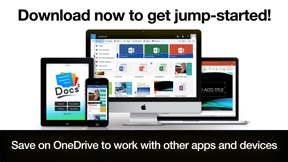
– Save docs offline or in OneDrive to work with other apps and devices.
QUICKLY LEARN TO:
– Create Word, Excel and PowerPoint documents.
– Update your calendar and manage mail with Outlook.
– Edit and add comments to documents.
– Save, print, publish and share documents.
– Add charts, pictures, animations and effects.
– Insert a table of contents, headers, and footers.
– Create and print custom labels and PDFs.
– Work with documents while on the go.
– And so much more...
DEVELOP YOUR SKILLS WITH THE BEST DOCUMENT BROWSER
– Enjoy streamlined steps to work with documents in OneDrive.
– Work with the most popular document types and formats.
– Avoid frustrating file incompatibility, and "View Only" headaches of other apps.
– Secure your files with Face ID, Touch ID, or passcode.
– Type what you want to do, and the new Tell Me feature will show you how!
SAVE YOUR WORK ONLINE FOR USE ACROSS YOUR DEVICES
– Because working without the cloud is so 1999...
– Simply save your files to OneDrive to edit them everywhere.
– Automatically sync documents for use across your devices.
– Easily share your documents with friends and colleagues.
– Enjoy greater freedom with online and mobile editing.
EXPLORE HUNDREDS OF PROFESSIONAL QUALITY TEMPLATES
– Browse a free treasure trove of time saving templates.
– Select the perfect layout or theme, and edit online or save offline.
– Start creating beautiful documents in no time!
LEARN FROM THE MASTERS
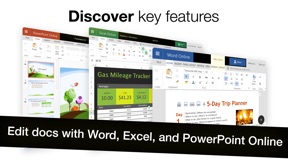
– The included guides show you everything you need to be more productive, discover key features, and learn to get things done fast.
Download now to get jump-started!
____________
NOTICE: Microsoft Office 365, Word, Excel, PowerPoint, Outlook, OneNote, and OneDrive are property or trademarks of Microsoft Corporation. Docs² is a property and trademark of Docs Squared, and is neither produced by, endorsed by, nor affiliated with Microsoft Corporation. Access to Microsoft Office functionality and templates is available for free through Microsoft Office Online, or you can work offline with even more features via an Office 365 trial subscription. © 2013-2018 Docs Squared, LLC. All rights reserved.

Novità nella versione 5.0

This update from Apple will improve the functionality of this app. No new features are included.
Great news! Bugs have been squashed and are extremely rare in this version. You'll love the results!
- Over 99.6% of customers don't report experiencing any technical issues.
- In the unlikely event of a problem: Contact us anytime. We’re happy to help!
New Features:
• Designed to feel faster, more fun, and help you get things done!
• Secure access to your files with Face ID, Touch ID, or passcode.
• Support for the new iPhone X and iPad Pro.
Other improvements...
– Added support for business and education, in addition to personal users.
– Streamlined steps for document editing.
– Stability and performance improvements.
– Interface and other enhancements.
– Optimized for iOS 11.
– Content updates.
– Other fixes.

Rivenditore

Nome

Docs Squared, LLC

URL

Informazioni

Sviluppatore

Versione

5.0

Dimensione

87,1 MB

Game Center

No

VPP Device Licensing

Classifica

Classificazione: 4+

Compatibilità

iOS 9.0 o successivo

Dispositivi

iPhone 4S, iPhone 5, iPhone 5c, iPhone 5s, iPhone 6, iPhone 6 Plus, iPhone 6s, iPhone 6s Plus, iPhone SE, iPhone 7, iPhone 7 Plus, iPhone 8, iPhone 8 Plus, iPhone X, iPhone XR, iPhone XS, iPhone XS Max, iPhone 11, iPhone 11 Pro, iPhone 11 Pro Max, iPhone SE (2a generazione), iPhone 12, iPhone 12 Pro, iPhone 12 Pro Max, iPhone 12 mini, iPhone 13, iPhone 13 Pro, iPhone 13 Pro Max, iPhone 13 mini, iPhone SE (3a generazione), iPhone 14, iPhone 14 Plus, iPhone 14 Pro, iPhone 14 Pro Max, iPhone 15, iPhone 15 Plus, iPhone 15 Pro, iPhone 15 Pro Max, iPhone 16, iPhone 16 Plus, iPhone 16 Pro, iPhone 16 Pro Max, iPhone 16e, iPhone 17, iPhone 17 Pro, iPhone 17 Pro Max, iPhone Air, iPhone 17e, iPad 2 (Wi-Fi), iPad 2 (3G), iPad (3a generazione) (Wi-Fi), iPad (3a generazione) (4G), iPad (4ª generazione) (Wi-Fi), iPad (4ª generazione) (4G), iPad (5ª generazione) Wi-Fi, iPad (5ª generazione) Wi-Fi + Cellular, iPad (6a generazione) Wi-Fi, iPad (6a generazione) Wi-Fi + Cellular, iPad Pro, iPad Pro (Cellular), iPad Pro (9,7 pollici), iPad Pro (9,7 pollici) (Cellular), iPad Pro da 12,9 pollici (2a generazione), iPad Pro da 12,9 pollici (2a generazione) Wi-Fi + Cellular, iPad Pro da 10,5 pollici, iPad Pro da 10,5 pollici Wi-Fi + Cellular, iPad Pro da 11 pollici, iPad Pro da 11 pollici Wi-Fi + Cellular, iPad Pro da 12,9 pollici (3a generazione), iPad Pro da 12,9 pollici (3a generazione) Wi-Fi + Cellular, iPad Air, iPad Air (Cellular), iPad Air 2, iPad Air 2 (Cellular), iPad Air (terza generazione), iPad Air (terza generazione) Wi-Fi + Cellular, iPad mini (Wi-Fi), iPad mini (4G), iPad mini Retina, iPad mini Retina (Cellular), iPad mini 3, iPad mini 3 (Cellular), iPad mini 4, iPad mini 4 (Cellular), iPad mini (5ª generazione), iPad mini (5ª generazione) Wi-Fi + Cellular, iPad (7ª generazione) Wi-Fi + Cellular, iPad Pro da 11 pollici (2a generazione), iPad Pro da 11 pollici (2a generazione) Wi-Fi + Cellular, iPad Pro da 12,9 pollici (4a generazione), iPad Pro da 12,9 pollici (4a generazione) Wi-Fi + Cellular, iPad Air (4ª generazione) (Wi-Fi), iPad Air (4ª generazione) (Wi-Fi + Cellular), iPad (8ª generazione) Wi-Fi, iPad (8ª generazione) Wi-Fi + Cellular, iPad Pro da 11 pollici (3a generazione), iPad Pro da 11 pollici (3a generazione) Wi-Fi + Cellular, iPad Pro da 12,9 pollici (5ª generazione), iPad Pro da 12,9 pollici (5ª generazione) Wi-Fi + Cellular, iPad (9ª generazione), iPad (9ª generazione) Wi-Fi + Cellular, iPad mini (6ª generazione), iPad mini (6ª generazione) Wi-Fi + Cellular, iPad Air (5a generazione), iPad Air (5a generazione) Wi-Fi + Cellular, iPad Pro da 11 pollici (4a generazione), iPad Pro da 11 pollici (4a generazione) Wi-Fi + Cellular, iPad Pro da 12,9 pollici (6a generazione), iPad Pro da 12,9 pollici (6a generazione) Wi-Fi + Cellular, iPad (10a generazione), iPad (10a generazione) Wi-Fi + Cellular, iPad Air da 11 pollici (M2) Wi-Fi, iPad Air da 13 pollici (M2) Wi-Fi, iPad Air da 13 pollici (M2) Wi-Fi + Cellular, iPad Pro da 11 pollici (M4) Wi-Fi, iPad Pro da 11 pollici (M4) Wi-Fi + Cellular, iPad Pro da 13 pollici (M4) Wi-Fi, iPad Pro da 13 pollici (M4) Wi-Fi + Cellular, iPad mini (A17 Pro) Wi-Fi, iPad mini (A17 Pro) Wi-Fi + Cellular, iPad (A16) Wi-Fi, iPad (A16) Wi-Fi + Cellular, iPad Air da 11 pollici (M3) Wi-Fi, iPad Air da 11 pollici (M3) Wi-Fi + Cellular, iPad Air da 13 pollici (M3) Wi-Fi, iPad Air da 13 pollici (M3) Wi-Fi + Cellular, iPad Pro da 11 pollici (M5) Wi-Fi, iPad Pro da 11 pollici (M5) Wi-Fi + Cellular, iPad Pro da 13 pollici (M5) Wi-Fi, iPad Pro da 13 pollici (M5) Wi-Fi + Cellular, iPad Air da 11 pollici (M4) Wi-Fi, iPad Air da 11 pollici (M4) Wi-Fi + Cellular, iPad Air da 13 pollici (M4) Wi-Fi, iPad Air da 13 pollici (M4) Wi-Fi + Cellular, iPod touch (5ª generazione), iPod touch (sesta generazione), iPod touch (7ª generazione)

Lingue

inglese

App Store: Valutazione dei clienti

Valutazioni e recensioni

4,7 di 5 (28 valutazioni)

App Store: Recensioni clienti

2018-06-03

Buona

Buona
luigisciumbata
Versione 5.0
2015-11-25

A

È una truffa? 9 euro per la pubblicità delle applicazioni Office a pagamento?
Poi un
Versione 3.1
2014-10-30

Inutile

Inutile istallarlo per poi trasferire i documenti da modificare in Microsoft Word ed Excel. A cosa serve????
Claudio-M-
Versione 1.0
2014-02-09

È una truffa!! Non compratelo!!

Non serve assolutamente a niente. Non apre le applicazioni office con un proprio programma ma con i programmi dei servizi remoti che raccoglie. Ad. esempio se hai già l'app Skydrive, puoi aprire un file xlsx con excel web app e Full Docs non serve proprio a una pippa.
Disonesti!!
Cazdamaza
2013-12-29

Rubasoldi !!!!

Nn serve a nulla nn acquistatela !!!!
Maxbiax
Versione 1.6
2013-12-29

Meno di così non si può !!!

Un'app che non serve a nulla se non rubare soldi. Sostanzialmente Ti fa vedere solo un tutorial per usare sky drive !!
edojack
Versione 1.26