InformazioniTerminiPrivacyContatto
 
Aggiornamento
Switcher Studio

Switcher Studio

Data release: 2014-09-25
Copyright © 2012-2020 Switcher Inc.
Switcher Studio - QR Code
Versione 5.1.3
4+
Scarica su App Store
Versione 5.1.3
4+
Scarica su App Store
Data release: 2014-09-25
Copyright © 2012-2020 Switcher Inc.

Istantanee iPhone

Screenshot
Screenshot
Screenshot
Screenshot
Screenshot
Screenshot
Screenshot

Istantanee iPad

Screenshot
Screenshot
Screenshot
Screenshot
Screenshot
Screenshot
Screenshot

Descrizione

Switcher Studio lets you capture and stream video from multiple iPhones and iPads — and edit it in real time — helping you connect with your community in the most engaging way yet.
Whether you’re syncing multiple iOS devices or just using one, your Switcher account lets you polish live videos to create something amazing. It’s perfect for streaming talk shows and podcasts, meetings and company announcements, demos, education and training sessions, marketing and creative content, live events, sports, and more. And the intuitive interface ensures everyone can create stunning videos.
Feature overview:
- Multicamera streaming: Wirelessly connect up to 9 iPhones or iPads to switch camera angles with a single tap.
- Social video integrations: Stream live directly to Facebook, YouTube, LinkedIn, Microsoft Stream, and beyond.
- Live-editing: Switch camera angles, add graphics, b-roll, text, titles, effects, and more in real time.
- Image insertion: Tap to display images, logos, or graphics in your videos.
- Prerecorded video: Roll in prerecorded videos for openers, b-roll, interviews, or special segments.
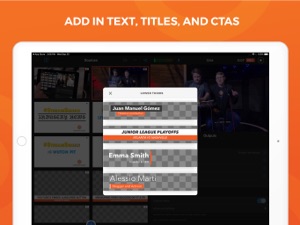
- Customizable text: Easily add and edit text, titles, CTAs, and lower thirds.
- Video Chat: Bring in a guest caller, co-host, or on-site correspondent from anywhere.
- Switcher Cloud: Store your video assets in the Switcher Cloud for access on any device.
- Camera control: Adjust each camera’s exposure, white balance, focus, and zoom in one place.
Why Switcher Studio?
- No expensive gear: Switcher works entirely with iPhone and iPad cameras.
- Zero turnaround time: Live-editing ensures that when you’re done shooting, you’re done editing.
More features to love in Switcher:
- Stream and record: Record 1080p or 4K video from multiple cameras and export the auto-synced files for Final Cut Pro.
- Facebook comments: Tap Facebook comments in the Switcher app to display them in your stream.
- Multiview layouts: Show multiple camera angles or sources at once with side-by-side, split-screen, and picture-in-picture layouts.
- Scoreboard extension: Keep score during sports streams with customizable Scoreboard templates.
- RTMP streaming: Use RTMP data to stream to Twitter, Vimeo, Twitch, Ustream, and nearly anywhere else.
- Screensharing: Show presentations, websites, games, and apps in your livestream or video by sharing your computer or device screen though our Switcher Cast app (available for Mac, PC, and iOS).
- Audio control: Connect your audio mixer to ensure perfect sound for viewers.
- HDMI output: Send live video to a projector or external display with HDMI or AirPlay.
Got questions? Email us at support@switcherstudio.com
Privacy policy: http://switcherstudio.com/privacy-policy
Terms of use: http://switcherstudio.com/terms-of-use
Compatible devices: http://switcherstudio.com/compatible-devices

Novità nella versione 5.1.3

Improved compatibility with iOS 14

Rivenditore

Nome

Switcher Inc.

Informazioni

Sviluppatore

Categorie

Versione

5.1.3

Dimensione

117,2 MB

Game Center

No

VPP Device Licensing

Classifica

Classificazione: 4+

Compatibilità

iOS 13.0 o successivo

Dispositivi

iPhone 5s, iPhone 6, iPhone 6 Plus, iPhone 6s, iPhone 6s Plus, iPhone SE, iPhone 7, iPhone 7 Plus, iPhone 8, iPhone 8 Plus, iPhone X, iPhone XR, iPhone XS, iPhone XS Max, iPhone 11, iPhone 11 Pro, iPhone 11 Pro Max, iPhone SE (2a generazione), iPad (5ª generazione) Wi-Fi, iPad (5ª generazione) Wi-Fi + Cellular, iPad (6a generazione) Wi-Fi, iPad (6a generazione) Wi-Fi + Cellular, iPad Pro, iPad Pro (Cellular), iPad Pro (9,7 pollici), iPad Pro (9,7 pollici) (Cellular), iPad Pro da 12,9 pollici (2a generazione), iPad Pro da 12,9 pollici (2a generazione) Wi-Fi + Cellular, iPad Pro da 10,5 pollici, iPad Pro da 10,5 pollici Wi-Fi + Cellular, iPad Pro da 11 pollici, iPad Pro da 11 pollici Wi-Fi + Cellular, iPad Pro da 12,9 pollici (3a generazione), iPad Pro da 12,9 pollici (3a generazione) Wi-Fi + Cellular, iPad Air, iPad Air (Cellular), iPad Air 2, iPad Air 2 (Cellular), iPad Air (terza generazione), iPad Air (terza generazione) Wi-Fi + Cellular, iPad mini Retina, iPad mini Retina (Cellular), iPad mini 3, iPad mini 3 (Cellular), iPad mini 4, iPad mini 4 (Cellular), iPad mini (5ª generazione), iPad mini (5ª generazione) Wi-Fi + Cellular, iPad (7ª generazione) Wi-Fi, iPad Pro da 11 pollici (2a generazione), iPad Pro da 11 pollici (2a generazione) Wi-Fi + Cellular, iPad Pro da 12,9 pollici (4a generazione), iPad Pro da 12,9 pollici (4a generazione) Wi-Fi + Cellular, iPad Air (4ª generazione) (Wi-Fi), iPad Air (4ª generazione) (Wi-Fi + Cellular), iPad (8ª generazione) Wi-Fi, iPad (8ª generazione) Wi-Fi + Cellular, iPod touch (sesta generazione), iPod touch (7ª generazione)

Lingue

francese, inglese

App Store: Valutazione dei clienti

Valutazioni e recensioni

4,0 di 5 (12 valutazioni)

App Store: Recensioni clienti

2018-10-21

Not working with fb live

Actually it’s not working with fb live. The stream starts properly on the page you admin but when you stop the broadcasting using the app , the stream doesnt stop on facebook and the live stream keeps going on facebook. You cannot save or stop live from facebook neither so basically it’s totally useless at the moment.
Rino79
Versione 3.8.2
2018-06-20

Simply the best

For Mojo professional No words to say except: super!!! Simple, powerful, top quality
Fac1971
Versione 3.8.0